
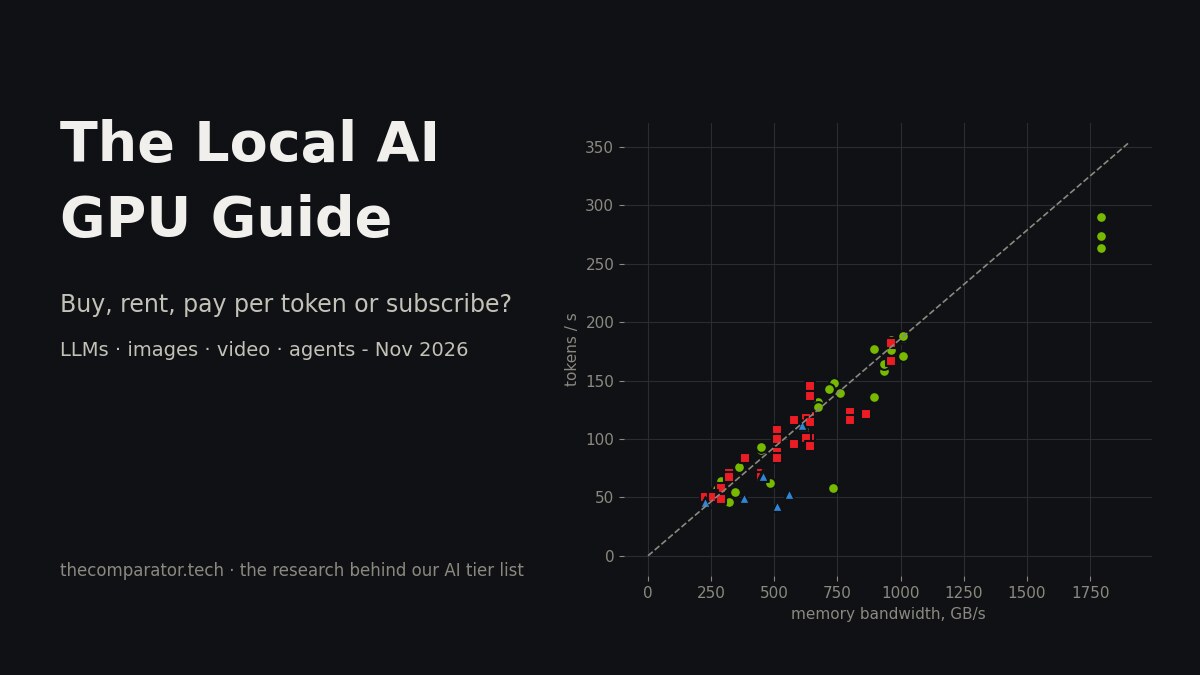
November 2026 edition · edited November 22. Price examples were checked on November 17-18; live offers change daily - our GPU comparison always shows today’s offers. Every figure is labelled: [measured] published reproducible measurement, [calculated] our arithmetic from the stated inputs, [estimate] derived from measured neighbours, [source] a third-party figure we did not reproduce.
Reading offline? Download this guide as a PDF (A4, offline edition). The PDF is a snapshot of November 22, 2026; this page and the tier list keep updating.
We rebuilt the AI part of our GPU tier list in November 2026, and this guide is the research behind it. It answers one question from every angle: what is the best way for you to run AI - a graphics card of your own, a rented one, an API, a subscription, or an agent - and if it is a card, which one? It covers text models, images, video and coding agents; NVIDIA, AMD and Intel; consumer, professional and data-center cards; home, office and compact builds; multi-GPU; software; and what each option really costs in late 2026.
Before using the grades: our comparison baseline uses Llama 2 7B Q4_0, Stable Diffusion 1.5 FP16 and a Wan 2.2 workflow. They are reference workloads, not a list of models you should install today. Their grades help narrow a shortlist; they do not establish the ranking for every 2026 model or software stack. §2 states the limits, and §4 shows how newer workflows can change the choice.
Short on time? Read §1 and §18.
Contents
- The short version: decide in two minutes
- How we researched this - and why you can check it
- What “local AI” means in practice - and what quality to expect
- How a graphics card turns into AI speed: two different physics
- The cards on the market in November 2026
- NVIDIA, AMD, Intel: what each brings, and where each hurts
- Why the community steers people away from AMD and Intel for AI - case by case
- How good are local models, really?
- Builds: from a first card to a team server
- Five ways to get AI: buy a card, rent one, pay per token, subscribe, or run agents
- Setting it up: from a new card to a working system, step by step
- The software stack - what runs where
- Where to get models, and how to judge one for your job
- Use cases with numbers
- Using our tier list and GPU comparison for AI
- FAQ
- Glossary
- Conclusions: what is cheaper, what is more useful - case by case
1. The short version: decide in two minutes
Three questions decide almost everything:
- What do you want to run? Text (chat, coding help, agents, document Q&A), images, video, or training your own variants. Text and images reward different hardware.
- How big is the model? Model size decides how much video memory (VRAM) you need. If a model does not fit in VRAM, nothing else about the card matters much.
- How much will you use it, and does the data have to stay with you? Light use almost never pays back a graphics card. Heavy, private or unlimited use often does.
Where to go next
| If you… | Read | Then open |
|---|---|---|
| mostly chat or write, a few times a day | §10 (subscriptions win on cost), §18 | - |
| want a coding agent | §10.5 agents, §8 model quality, §18 | GPUs ranked for AI agents; only cards graded A or better |
| generate lots of images, or video | §4.4, §9, §10 (designer profile) | GPUs ranked for AI images; tier list sorted by AI video |
| must keep data private (clients, NDA, health, legal) | §9 builds, §10.7, §11 | GPUs ranked for Local LLM (text) |
| run AI for an office or team | §9.7 team server, §10 (office profile) | - |
| already own a GPU and wonder what it can do | §3, §4, our tier list (four AI columns) | Tier list sorted by Local LLM (text) - find your card |
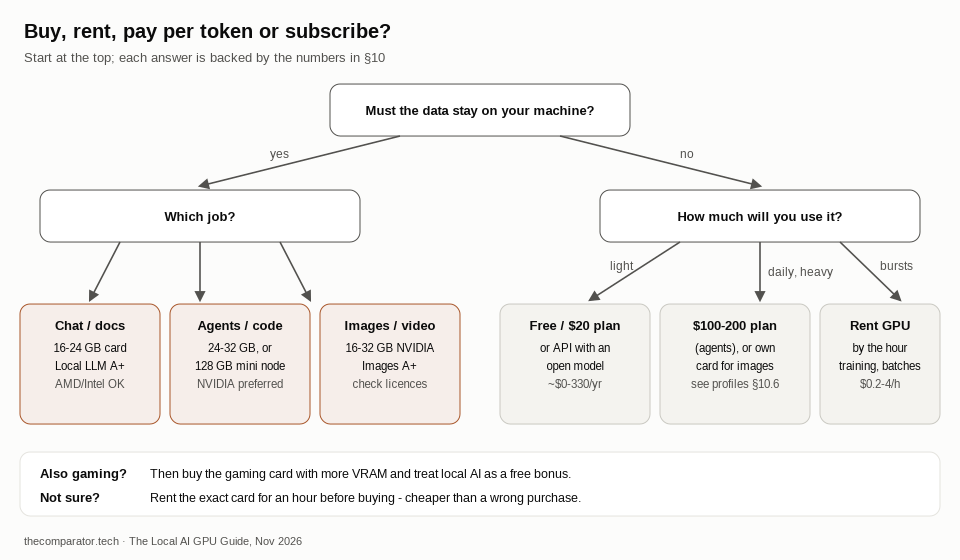
What the research found, in six lines
- VRAM decides whether a model runs at all. A 4-bit model needs roughly 0.6 GB per billion parameters plus room for the conversation. When a dense model spills out of VRAM into system memory, speed typically falls by an order of magnitude or more. Mixture-of-experts models are the exception: with the right engine, part of them can live in system RAM at a usable speed (§4.3).
- Memory bandwidth decides how fast text appears. On the same model and a short conversation, text speed tracks bandwidth across NVIDIA, AMD and Intel almost linearly - our formula is within 8% of the median published run [measured] - so a 2020 RTX 3090 still writes text faster than a 2025 RTX 5070.
- Images and video are a different physics. They reward matrix units (tensor/AI cores) and a mature software path; here the RTX 5070 beats the RTX 3080, and AMD/Intel fall further behind than in text [measured].
- The vendor matters little for chat speed and a lot for everything else - reading long prompts, agents, image/video tools, training, multi-GPU serving. That is why the community still defaults to NVIDIA, and §7 shows where AMD and Intel are a deliberate, good choice.
- For most people, renting or subscribing is cheaper than buying in late 2026. GPU prices are inflated by the memory shortage (an RTX 5090 that is actually in stock costs about $6,500, more than three times its $1,999 launch price). Owning wins with heavy daily use, privacy requirements, unlimited image/video generation - or when the card also plays your games [calculated].
- Two GPUs add memory, not speed. They let a bigger model fit; speed per user improves only with the right software (tensor parallelism) and mostly helps when many people share the machine [source].
Our GPU tier list now has four AI columns built from this research - Local LLM (text), AI agents & long documents, AI images and AI video - and a matching set of priorities for each in our GPU comparison, which ranks today’s offers by Value. §4.5 explains why the same card can get four different letters; §15 shows how to read them.
2. How we researched this - and why you can check it
We are a price-and-specs comparison site, and our GPU tier list grades every card for gaming, ray tracing, creative work and AI. In November 2026 we found our single “AI” grade was trying to answer several different questions with one letter: it measured how fast a card writes text, but many people mean images and video, where the ranking flips. This guide is the research we did to fix the tier list, written up so you can use it - and audit it.
What we checked for this edition
- Collected 67 published llama.cpp benchmark runs across CUDA, ROCm and Vulkan on NVIDIA, AMD and Intel cards, all on the same model and quantization (Llama 2 7B, Q4_0). The runs use different contributors, builds and systems, so they are a reference dataset, not a controlled head-to-head lab test. Source: the llama.cpp project’s public scoreboards [measured].
- Filled memory bandwidth for every GPU in our catalog and checked a sample of 41 models (over 10%) against manufacturer datasheets. Two values were wrong in our data and were corrected (Radeon AI PRO R9700: 644 → 640 GB/s; one Arc Pro chip label). Showing those errors is the point: it tells you how far to trust the rest.
- Used one lab’s image-generation measurements (Procyon Stable Diffusion 1.5, ComputerBase) for 28 cards so the image grade compares like with like, and derived estimates for unmeasured cards from measured cards of the same architecture - marked as estimates on the tier list.
- Added a second, larger test for images and video (19 November): one Japanese lab, chimolog, ran the same ComfyUI workflows on 41 cards from all three vendors - Stable Diffusion 1.5, SDXL, Qwen-Image and the Wan 2.2 video model at 480p and 720p [measured, August 2025]. It shows where images and video agree and where they part ways (§4.4, §4.6).
- Read the community record: user reports, issue trackers and reviews on AMD and Intel for AI (§7), with each case linked.
- Priced the alternatives - GPU rental, API, subscriptions and agents - from public price pages with their check dates (§10), and show every input next to each calculation.
Check our work. The measurements, the validation checks and a script that reproduces the speed model, rental break-even and electricity examples are published with it: research data and calculations (CSV files, a Python script, the charts as images).
How to read the numbers
- [measured] - a reproducible measurement (ours or published with method).
- [calculated] - our arithmetic from stated inputs.
- [estimate] - derived from measured neighbours; the method is stated next to it.
- [source] - a third-party figure we did not reproduce; treat as indicative.
Prices move weekly. Every price has a date; card prices come from our live catalog, so the tier list and our GPU comparison always show today’s numbers even when this text is a few weeks old.
An older benchmark is a control, not a current buying verdict
We keep a common workload so that results from different cards can be compared. That makes Llama 2 7B useful as a reference even though it is not our recommendation for a new installation. It does not make an old test a substitute for testing today’s models.
| Grade | Evidence used | What it can help you check | What it does not establish |
|---|---|---|---|
| Local LLM (text) | VRAM and bandwidth, informed by published Llama 2 7B Q4_0 runs | memory headroom and short-context, single-user decode behaviour | speed of every dense model, MoE, long context or engine |
| Agents & long documents | stricter memory bands and llama.cpp pp512 | a shortlist with more memory and stronger short-prompt processing | tool-use quality, working context capacity, task completion or 128K latency |
| AI images | Procyon SD 1.5 FP16, one lab | performance on that reference workload | the same order on FLUX.3, FP8/FP4 or a different ComfyUI workflow |
| AI video | Wan 2.2, ComfyUI, August 2025 software | time and memory limits observed in that setup | current LTX-2.5 performance or a permanent limitation of Radeon/Arc hardware |
A 2026 price beside a grade does not mean the benchmark was run in 2026. The 8% median error quoted below is an in-sample fit to the text reference runs, not a guaranteed error for a new model. There is no measured percentage that says these four grades reproduce the hierarchy of all current AI workloads. Use them to narrow the search, then test the exact workflow before an expensive purchase. §4.7 gives practical examples.
What this research changed on the site
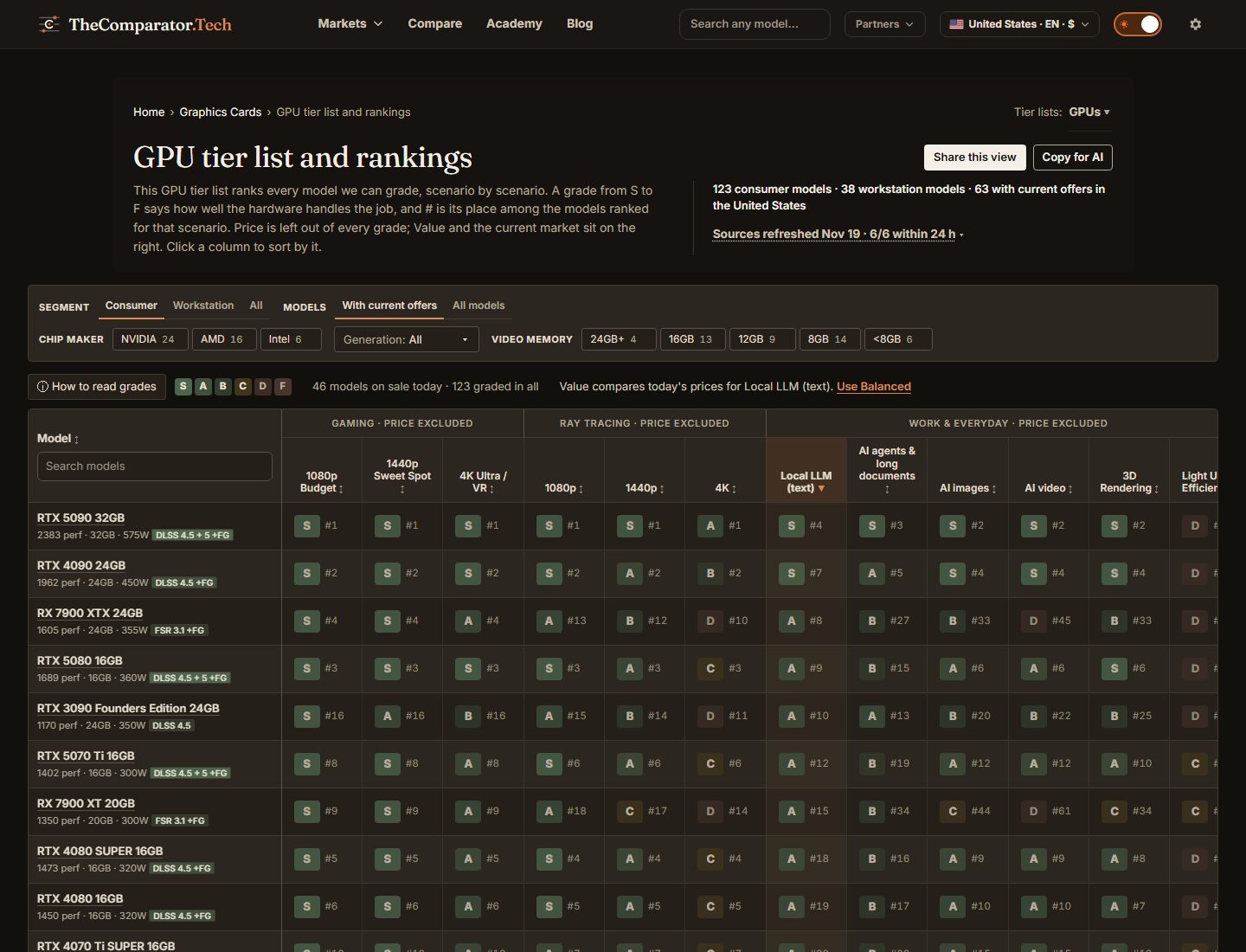
- The single AI grade became four (18-19 November): Local LLM (text) - VRAM gates plus memory bandwidth; AI agents & long documents - stricter memory gates for a long context plus measured prompt-reading speed; AI images - VRAM gates plus measured images per minute; AI video - measured time per clip, with the memory wall at 720p.
- Cards without matrix units (GTX, Pascal-era Tesla/Quadro, older Radeon) are capped, because modern AI software either does not run on them or runs very slowly.
- Professional and data-center cards are graded in every scenario, including gaming.
- Four sets of priorities in our GPU comparison - Local LLM (text), AI agents & long documents, AI images and AI video - rank cards by those capabilities against price.
The full rubric is in our methodology; §4.5 explains it in plain words, and §4.6 shows why four columns rather than one.
Who made this. Research, calculations and writing: the TheComparator.Tech Research Team. Editor responsible for the methodology: Andrii Zavorotnii, founder of TheComparator.Tech. We use AI tools for research, drafting and translation; figures link to their sources, and the assumptions and limits are stated alongside the calculations. We did not run a hardware lab: the measurements are other people’s, credited in place; the analysis, formulas, cost comparisons and grades are ours.
Have a different result on your own hardware? Compare notes with us. Include the model, quantization and software version so the result can be checked.
3. What “local AI” means in practice - and what quality to expect
“Running AI locally” covers very different jobs. They load a GPU differently, and the right card for one can be the wrong card for another.
3.1 Text: chat, writing, coding help, agents, document Q&A
A local language model is simply a large file of numbers (the “weights”) that a program such as llama.cpp, Ollama or LM Studio loads into the graphics card’s memory. Its size is counted in parameters, in billions (“8B”, “70B”). More parameters usually means a smarter model, but also a bigger file. To make files smaller, people store each weight with fewer bits - this is quantization, and “4-bit” (often labelled Q4_K_M) is the common choice because it shrinks a model about four times with little loss in quality (§8.2).
That gives a handy rule: at 4-bit, a model needs about 0.6 GB of VRAM per billion parameters, plus 1-4 GB for the conversation itself. Here is what that means in practice [calculated]:
| Class | Typical examples (Nov 2026) | 4-bit weights | Card that fits it comfortably | What it is good for |
|---|---|---|---|---|
| 3-8B | small Qwen / Gemma / Llama | 2-5 GB | 8 GB | quick answers, summaries, simple automation, offline helper |
| 12-14B | mid Qwen / Gemma | 8-9 GB | 12-16 GB | solid everyday assistant, simple code |
| 20-32B dense, or 20B MoE | Qwen 27B-class, Gemma 31B, gpt-oss-20b | 12-20 GB | 24-32 GB (20B MoE fits 16 GB) | good writing and coding help, tool use |
| 70B dense | Llama 3.3 70B class | ~40 GB | 48 GB (two 24 GB cards) | strong general model, slow on one card |
| 80-120B MoE | gpt-oss-120b, Qwen3-Coder-Next (80B) | 45-65 GB | 64-128 GB (two to three cards, or a 128 GB mini-node) | near-frontier on many tasks, fast for its size |
| 200B+ MoE | GLM-5, DeepSeek V4, Kimi K3 | hundreds of GB | server class | the open-model leaders - not a home machine |
Read the table from your card upwards: find the row whose “comfortable” card matches yours, and that is the largest model class you can run well. Everything above it either does not load or crawls.
How good is it? The strongest open models now trade places with last year’s closed flagships on public benchmarks - but those are the server-class ones [source]. The models that fit one consumer card are a step behind the best paid assistants on hard reasoning and long agentic tasks, and closer on everyday writing, summarising and routine code. §8 has numbers; the practical pattern many experienced users settle on is a small private local model for everyday and sensitive work, plus a big hosted model for the hard problems [source].
Agents (a model that plans, calls tools, reads files and loops) are the most demanding text use: they read far more than they write, so prompt-reading speed and a large context window matter as much as generation speed (§4.2, §10.5).
3.2 Images
Stable Diffusion 1.5 and SDXL run on almost anything with 8 GB; FLUX.1 [dev] in 8-bit (FP8) needs about 12 GB and is comfortable on 16 GB; full-precision FLUX wants 24 GB+; FLUX.2 [dev] (32B) needs 54-90 GB unquantized [source]. Time per 1024×1024 FLUX image (FP8, 20 steps): RTX 5090 ≈5.5 s, RTX 5080 ≈6.7 s, RTX 4090 ≈11.3 s, RTX 5060 Ti 16 GB ≈26 s, RTX 3090 ≈26 s [source]. Blackwell (RTX 50) cards also have native FP4, which roughly halves FLUX time again on an RTX 5090 [source].
Licensing matters here: the FLUX.1 [dev] model card distinguishes its non-commercial model licence from the generated images, which may be used commercially under its terms. Do not confuse selling an image with commercially deploying the model. Check the exact model and intended use before client work.
Newer image models (autumn 2026). SD 1.5, SDXL and FLUX.1 are still what most benchmarks use, because they run everywhere and results compare - but they are one to two years old. The current generation puts 5-13 billion parameters in the image part and adds a separate text encoder: FLUX.3 Image Klein (5.6B), MOSS-Image (5B), Qwen-Image 2.1 (7B), Fibo 2.0 (8B), Krea 2 Turbo (12B, 8 steps). Quantization and moving the text encoder to system RAM can reduce GPU memory use, but there is no common 16 GB requirement across these models. For example, the FLUX.3 reference implementation reports 31 GB peak in BF16 and 25-26 GB with lower-precision weights on a B200, with its prompt upsampler disabled [source: model card]. Check the complete workflow, not just the size of the image transformer. Independent speed tests across many cards barely exist yet. The one we found for a Qwen-Image model (the first, 20B version at 3-bit, 41 cards) keeps roughly the SDXL order of cards, with the 24 GB RTX 3090 moving up (§4.4). §3.7 lists the new models with their licences, which differ more than their speeds.
3.3 Video
Open video models (Wan 2.x and others) are the heaviest home workload. Wan 2.2’s 5B model makes a 5-second 720p clip in about 9 minutes on an RTX 4090; its 14B models need 24 GB+ with 8-bit weights and offloading for 720p, and at full precision exceed every consumer card [source]. Practical floors: 8 GB = small model at 480p; 12-16 GB = 14B quantized at 480p; 24 GB = real work; 32 GB = 14B without tricks. In a 41-card test of a 5-second Wan 2.2 clip, 720p finished only on NVIDIA cards with 16 GB or more (§4.4).
Newer video models. LTX-2.5 (Lightricks, August 2026) makes picture and sound in one pass. It combines a 22B transformer with a separate 12B text encoder. The reference implementation supports FP8 conversion and CPU/disk offload; it does not establish a universal 24 GB minimum. Those components alone are roughly 34 GB at one byte per parameter before the VAEs, activations and other runtime memory. A 24 GB setup needs some components offloaded or further compressed; verify the precise workflow and resolution [calculated; source: official repository]. Wan 2.2 stays the common reference: it is open for any use (Apache 2.0) and the most widely benchmarked.
3.4 Light jobs almost any GPU handles
Speech-to-text (Whisper), text-to-speech, image upscaling, background removal, embeddings for search. These run on 6-8 GB cards and are rarely a reason to buy one.
3.5 Training and fine-tuning
Fine-tuning a LoRA adapter on a 7-14B model fits on 16-24 GB; full fine-tuning of anything large does not fit at home. This is where NVIDIA’s CUDA lead is widest: most training tools assume it (§7). For one-off training jobs, renting a data-center GPU by the hour is usually the sensible choice (§10.2).
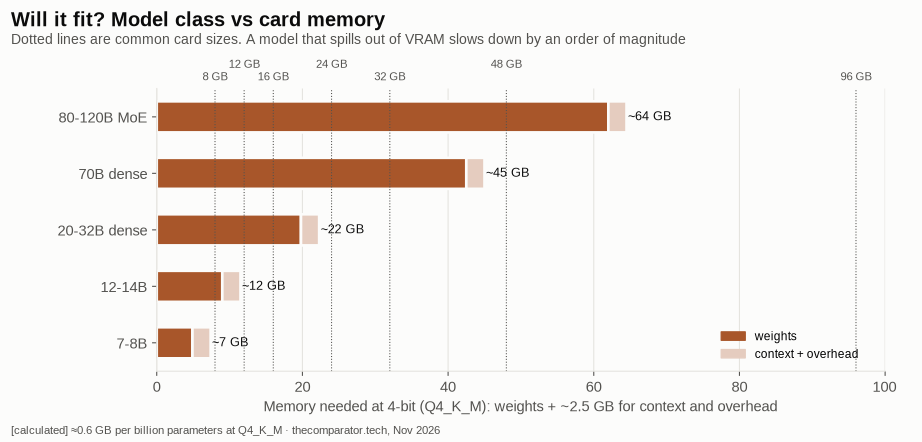
3.6 What each job needs from the card
The same card can be perfect for one job and frustrating for another. This table summarises the chapter: the first two columns tell you whether a job will run at all, the last tells you which property of the card makes it fast (§4 explains why).
| Job | Minimum VRAM | Comfortable | What decides speed |
|---|---|---|---|
| Chat with 7-8B | 6-8 GB | 12 GB | memory bandwidth |
| Chat with 27-32B | 16 GB (tight) | 24-32 GB | memory bandwidth |
| Agents / long documents | 16 GB | 24 GB+ | bandwidth and prompt reading (matrix units, software) |
| SD 1.5 / SDXL | 6-8 GB | 12 GB | matrix units + software |
| FLUX.1 [dev] | 12 GB (FP8) | 16-24 GB | matrix units + low-precision formats |
| Newer image models (FLUX.3 Klein, Qwen-Image 2.1, Krea 2) | workflow-dependent; encoder/offload matters | check the complete pipeline; §4.7 | matrix units + low-precision formats |
| Video (tested Wan 2.2 workflow) | 8 GB (small, 480p) | 24-32 GB; the tested 720p workflow needed 16 GB+ | matrix units + VRAM + software |
| Video (LTX-2.5, 22B + encoder) | workflow-dependent; offload may be needed | fit transformer, encoder, VAEs and runtime memory | matrix units + VRAM |
| LoRA training | 12-16 GB | 24 GB | matrix units + CUDA tooling |
3.7 Newer image and video models, and who may use them
For anyone selling images or video, the licence matters as much as the speed. Our reading of each licence on 19 November 2026 (not legal advice; the licence file in each repository is what counts):
| Model | Released | Size of the generating part | Memory (developer figure) | Commercial use |
|---|---|---|---|---|
| FLUX.3 Image Klein (Black Forest Labs) | 2026 | 5.6B | 25-31 GB peak with every part on one GPU | Non-commercial free; businesses under $5M yearly revenue may use the output commercially; others need a paid licence |
| Qwen-Image 2.1 (Alibaba Qwen) | Nov 2026 | 7B | not stated; CPU offload supported | Research and evaluation only; commercial use needs a separate licence |
| MOSS-Image (OpenMOSS) | Oct 2026 | 5B | not stated; low-memory mode | Code under Apache 2.0; the weights licence is not stated in the repository - ask before commercial use |
| Krea 2 Turbo (Krea) | Jun 2026 | 12B, 8 steps | not stated | Krea 2 Community Licence (gated); deployers must filter content; check the commercial terms |
| Fibo 2.0 Dev (Bria) | 2026 | 8B | not stated | Non-commercial (CC BY-NC 4.0); commercial use by agreement with Bria |
| MiniMax H3 Image (MiniMax) | 10 Nov 2026 | 33B + 67 GB text encoder | data-center GPUs | Not licensed in the EU, UK, US or South Korea; elsewhere commercial use is allowed, with written permission above $1M revenue |
| LTX-2.5, video + audio (Lightricks) | 11 Aug 2026 | 22B + 12B encoder | FP8 and CPU/disk offload supported; memory depends on workflow | Free for organisations under $10M yearly revenue; paid above; AI content must be labelled |
| Wan 2.2, video (Alibaba) | Jul 2025 | 14B active (27B total) or 5B | 8-32 GB depending on build | Apache 2.0 - any use |
| FLUX.1 [dev] (Black Forest Labs) | 2024 | 12B | 12 GB at FP8 | Non-commercial model licence; outputs may be used commercially under its terms; commercial model deployment is separate |
Two practical points. The models with the most generous licences (Wan 2.2, LTX-2.5 for small businesses) are not always the newest or the best-looking, so a studio may pick its model by licence first. And “open weights” does not mean “open for every country”: MiniMax H3 Image cannot be used under its licence by anyone in the EU, the UK, the US or South Korea.
4. How a graphics card turns into AI speed: two different physics
Almost every confusing AI benchmark makes sense once you separate two jobs that stress a GPU in opposite ways.
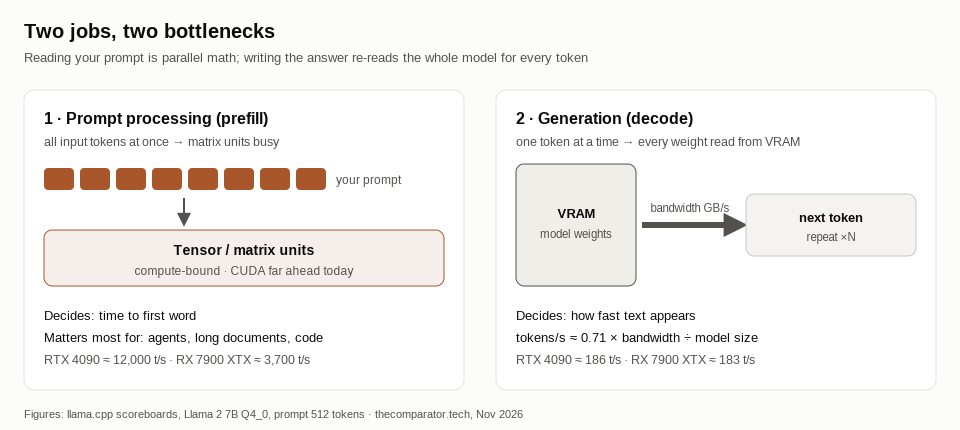
4.1 Writing text: limited by memory bandwidth
To produce each new word (token), a language model reads essentially all of its weights from VRAM once. A 20 GB model on a card that moves 1,000 GB/s can, at best, do about 50 of those passes per second. Real software reaches a stable fraction of that ceiling, so:
tokens per second ≈ k × memory bandwidth (GB/s) ÷ model size (GB)
k is simply the share of the theoretical maximum that real software achieves. We worked it out from 67 published llama.cpp runs of the same model on different cards [measured]. A value of 0.71 means the software reaches about 71% of what the memory could deliver in theory:
| Software path | k (median) | Runs |
|---|---|---|
| NVIDIA, CUDA | 0.71 | 23 |
| NVIDIA, Vulkan | 0.71 | 7 |
| AMD, Vulkan | 0.77 | 16 |
| AMD, ROCm | 0.63 | 14 |
| Intel Arc, Vulkan | 0.57 | 7 |
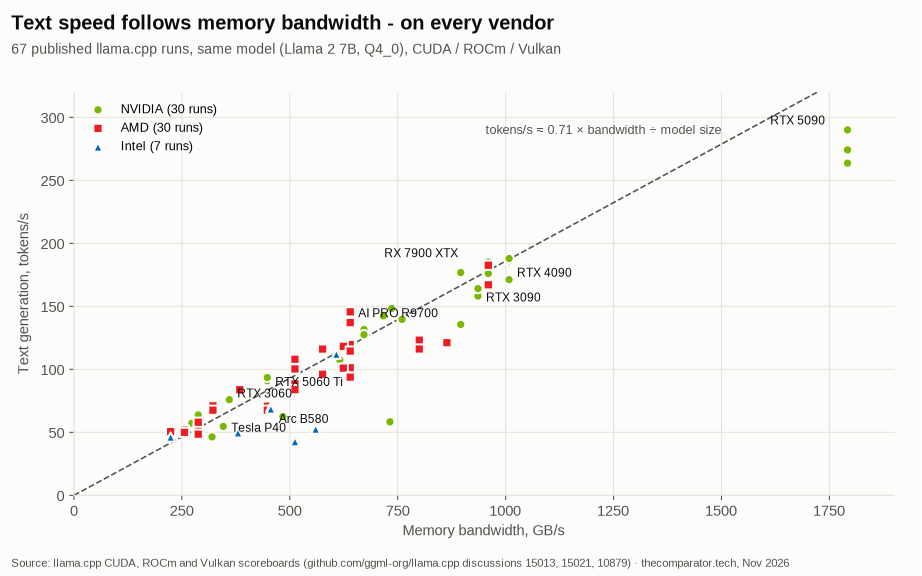
Two things follow. First, for chat speed the vendor barely matters - an RX 7900 XTX (960 GB/s) writes as fast as an RTX 4090 (1,008 GB/s) on the same model; on Vulkan it measured 183 tokens/s against the 4090’s 186 on CUDA [measured]. Intel’s current software path leaves more on the table. Second, newer is not faster for text if bandwidth is lower: the RTX 3080 12 GB (912 GB/s) out-writes the RTX 5070 (672 GB/s).
Put the formula to work and you can estimate a card’s chat speed from its specification sheet. Here is what it gives for popular cards and model sizes (one user, a short conversation, 4-bit models) [estimate from the formula]. “Does not fit” means the model plus its conversation needs more memory than the card has - it would spill into system RAM and slow to a crawl:
| Card | Bandwidth | VRAM | 8B | 14B | 32B | 70B |
|---|---|---|---|---|---|---|
| RTX 5090 | 1,792 GB/s | 32 GB | ~260 t/s | ~141 | ~64 | does not fit |
| RTX 4090 | 1,008 | 24 GB | ~146 | ~80 | ~36 | does not fit |
| RTX 3090 | 936 | 24 GB | ~136 | ~74 | ~34 | does not fit |
| RX 7900 XTX | 960 | 24 GB | ~151 | ~82 | ~37 | does not fit |
| Radeon AI PRO R9700 | 640 | 32 GB | ~101 | ~55 | ~25 | does not fit |
| RTX 5080 | 960 | 16 GB | ~139 | ~76 | does not fit | does not fit |
| RTX 5070 Ti | 896 | 16 GB | ~130 | ~71 | does not fit | does not fit |
| RX 9070 XT | 640 | 16 GB | ~101 | ~55 | does not fit | does not fit |
| RTX 5070 | 672 | 12 GB | ~97 | ~53 | does not fit | does not fit |
| RTX 5060 Ti 16 GB | 448 | 16 GB | ~65 | ~35 | does not fit | does not fit |
| Arc Pro B60 | 456 | 24 GB | ~53 | ~29 | ~13 | does not fit |
| Arc B580 | 456 | 12 GB | ~53 | ~29 | does not fit | does not fit |
How to read these numbers: a token is about three-quarters of a word, and people read at roughly 5-10 tokens per second. So anything above about 20 tokens/s feels instant in a chat, and the differences between the top cards matter less than they look. What matters more is the right-hand side of the table: memory decides which column you can use at all. A 16 GB card cannot run a 32B model however fast it is; a slower 24 GB card can.
How accurate is this? The formula is a model, not a measurement, and it has a known range of validity.
- On the 67 runs it was fitted on, the median error is 8%, and 80% of runs are within 18%. For current architectures (NVIDIA Turing and newer, AMD RDNA2 and newer, Intel Battlemage) the median error is 6% and 90% of runs are within about 21%. Old architectures miss badly (first-generation Arc and the HBM-based Tesla P100 by 60-130%), so we do not use the formula for them [measured].
- On bigger models it was not fitted on, it holds up on NVIDIA with dense 27B models: an RTX 5090 measured 77 tokens/s against 78 predicted; Qwen 3.8 27B at 4K context measured 40 / 46 / 75 tokens/s on the RTX 3090 / 4090 / 5090 against 40 / 43 / 77 predicted. A 32B model on an RX 7900 XTX measured 30 against 31. Some community tables disagree by more (an RTX 3090 on a 14B model: 55 measured, 76 predicted), usually where the settings are not stated [source; all checks listed in the research data].
- Where it does not apply:
- Long conversations. Every token also reads the growing conversation memory. On an RTX 4090 an 8B model fell from 131 tokens/s at 4K context to 53 at 65K (-59%); MoE models on big-memory systems lost about a quarter at 32K [source].
- Other engines and recipes. Tom’s Hardware measured Qwen 3.8 27B in vLLM on one RTX 5090 at about 20 tokens/s, far below what the card’s bandwidth allows, with SGLang roughly three times faster; and llama.cpp hit a long-context slowdown on the 4090 and 5090 but not on the 3090 [source]. Software can cost you more speed than the hardware gap between two cards.
- MoE models run at the speed of their active parameters, not their file size, so the formula with the full file size underestimates them.
- Several users at once (batching) and models that spill into system RAM follow different rules (§9.5, §4.3).
So read the table above as a starting estimate for one user, a short conversation, llama.cpp and a dense 4-bit model that fits in VRAM. The calibration error is not a guaranteed ±10-20% range for another model or engine.
4.2 Reading the prompt: limited by matrix units and software
Writing speed is only half the story. Before the first word appears, the model must process everything you gave it - the question, the chat history, a pasted document, an agent’s tool output. This “prefill” is parallel work and runs on the card’s matrix units (Tensor cores, AI accelerators). Here the vendors separate sharply [measured] (same model, prompt of 512 tokens):
| Card | Prompt processing | Text generation |
|---|---|---|
| RTX 5090 (CUDA) | 14,073 t/s | 290 t/s |
| RTX 4090 (CUDA) | 11,993 | 186 |
| RTX 3090 (CUDA) | 5,175 | 158 |
| RX 9070 XT (ROCm) | 5,055 | 101 |
| RX 7900 XTX (Vulkan) | 3,727 | 183 |
| Arc B580 (Vulkan) | 621 | 70 |
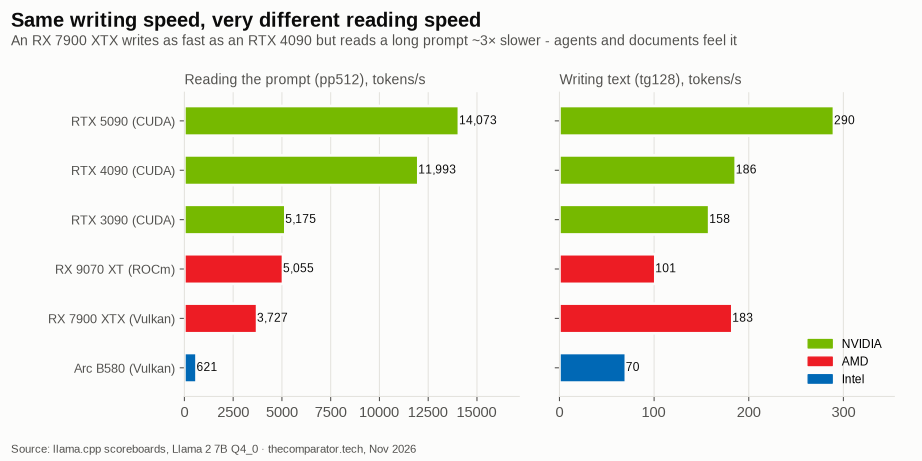
The left column is where the vendors part ways: the RTX 4090 and RX 7900 XTX have similar text-generation speed in these runs, but the 4090 processes the 512-token prompt about three times faster. That is a reason to test prompt processing separately for agents, coding assistants and document Q&A. It does not establish the same ratio at 32K or 128K, or tell you the wait before the first word in a different model. Long-context attention, cache reuse and the engine change that wait. Benchmark the model at the context length you intend to use.
4.3 VRAM: will it fit?
Memory is the first thing to check, because it is a hard limit rather than a speed difference. The calculation is simple:
Weights ≈ parameters × bits ÷ 8 (Q4_K_M ≈ 4.8 bits per weight → ~0.6 GB per billion parameters), plus the conversation memory (KV cache), which grows with context length and with every simultaneous user, plus ~1 GB of overhead. Mixture-of-experts models (gpt-oss, Qwen3-Coder-Next) need memory for all their parameters but run at the speed of their small active part - which is why big-memory, modest-bandwidth machines like 128 GB mini-PCs handle them well (§9.6).
When a model does not fit: dense versus mixture-of-experts. In an ordinary (dense) model every weight is read for every token, so whatever sits in system RAM is read at RAM speed - 60-100 GB/s on a desktop against 450-1,800 GB/s on a card - and speed drops 5-20×. Mixture-of-experts (MoE) models behave differently. Qwen3.6-35B-A3B has 35 billion parameters but uses only about 3 billion for each token. If the shared layers and the busiest experts stay on the card and the rest wait in system RAM, each token touches little of the slow memory, and engines built for this go far beyond what the VRAM size suggests:
- PolyStrata reports Qwen3.6-35B-A3B at 3-bit on a laptop RTX 4070 (8 GB) with 32 GB of RAM at 94-100 tokens/s writing and about 1,690 tokens/s reading - 2.7-3.5× faster reading and 1.5-1.8× faster writing than llama.cpp on the same laptop [source: developer figures, not reproduced by us].
- Strata, the engine PolyStrata builds on, runs the much larger Qwen3.8-Flash-Next with its experts in system RAM on NVIDIA and AMD cards from 12 GB [source: developer].
- Plain llama.cpp does a simpler version of the same trick with
--n-cpu-moe(§11.9).
What this changes: for MoE models, system RAM (size and speed), the PCIe link and the engine become buying criteria next to VRAM, and a 12-16 GB card with 64 GB of fast RAM can run models that a dense-only rule says need 24-48 GB. What it does not change: dense 27-70B models still have to fit in VRAM. Two cautions. These are developer measurements on specific models and quantizations. And both projects install with one-click scripts that download programs; on a computer with work data, read the installer and the network settings first, and keep the local API on localhost or behind a key.
Quantization trade-off in one line: stay at 4-bit (Q4_K_M) or above - below it quality drops off a cliff - and prefer a bigger model at Q4 over a smaller one at Q8 [source]. Details in §8.
4.4 Images and video: matrix units plus a mature software path
Image and video models work differently from chat models. Instead of writing one token at a time, they refine a whole picture over 20-50 steps, and every step is a large block of math. That makes them limited by the card’s matrix units (compute), not by memory bandwidth. Here newer architectures, low-precision formats (FP8, FP4) and the vendor’s software path decide speed. The clearest example in our data [measured], Procyon SD 1.5 seconds per image: RTX 5070 2.1 s vs RTX 3080 2.6 s - the opposite of their text ranking. AMD and Intel fall further behind than in text: the RX 7900 XTX needs 3.1 s and the Arc B580 4.2 s, and 8 GB cards crash on SDXL.
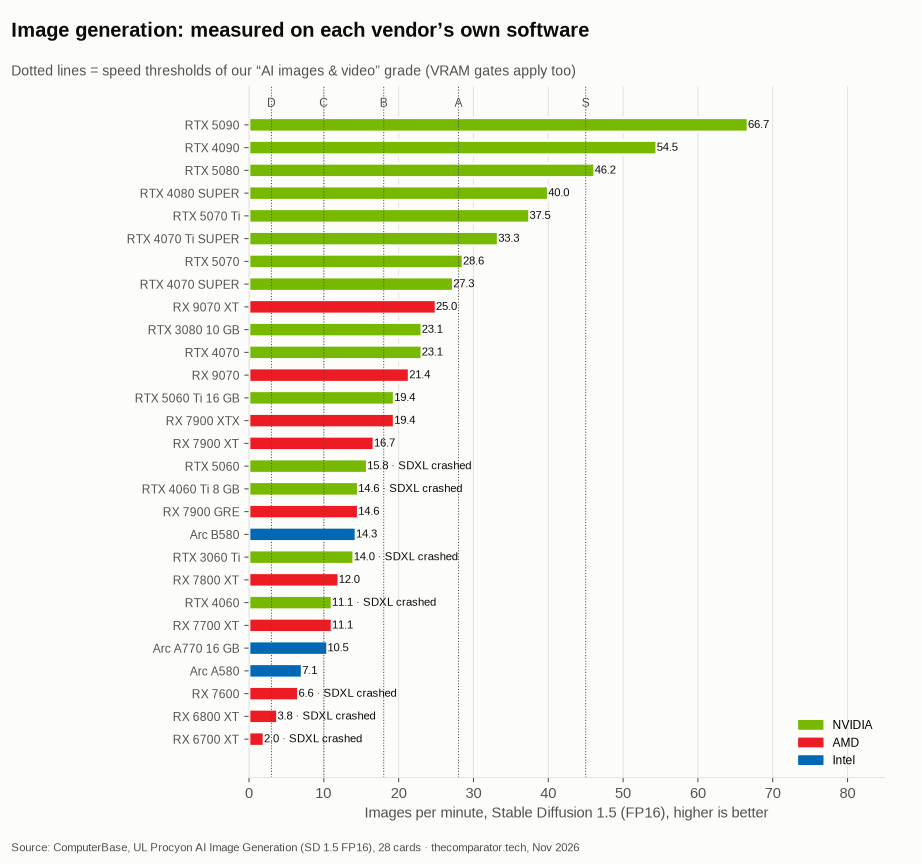
What this test can and cannot tell you. It is one test (Procyon, Stable Diffusion 1.5 at FP16) from one lab, run on 28 cards with each vendor’s own software. It is the largest like-for-like set we found, which is why our image grade uses it - but SD 1.5 is an older, smaller model, and its speed predicts FLUX and video only roughly. Most cards keep the same order, yet newer cards with FP8/FP4 support gain more on modern models than SD 1.5 shows: on FLUX in FP8 an RTX 5080 beats an RTX 4090, while on SD 1.5 it is slower (§3.2). So read the image grade as “image generation speed, measured on SD 1.5”: a comparison of that SD 1.5 workload, not a validated ordering for current FLUX or video models. We will add a second measured test across at least ten cards before changing how the grade is calculated.
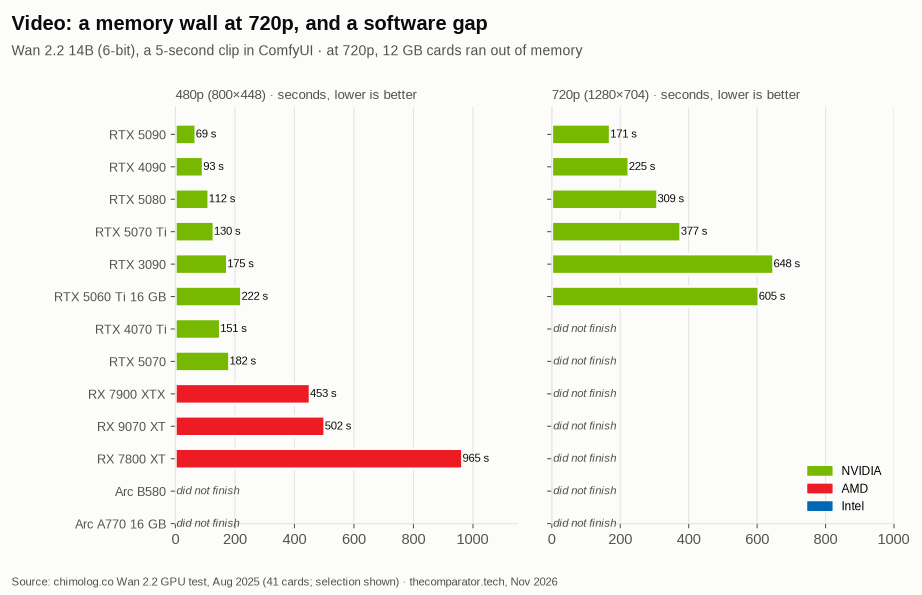
A second, larger test (added 19 November). chimolog, a Japanese hardware lab, ran the same ComfyUI workflows on 41 cards in August 2025: SD 1.5, SDXL, a Qwen-Image model and the Wan 2.2 video model (14B, 6-bit, 81 frames ≈ 5 seconds) at 480p and 720p [measured]. What it shows:
- Images and video rank NVIDIA cards almost the same way. The rank correlation between SDXL and 720p video is 0.96. A 5-second 720p clip took 171 s on the RTX 5090, 225 s on the RTX 4090 and 377 s on the RTX 5070 Ti.
- Video adds a memory wall. At 720p every card with 12 GB or less ran out of memory, including the RTX 4070 Ti and RTX 5070, which are fine for images. The slower RTX 5060 Ti 16 GB finished (605 s); the faster RTX 4070 Ti 12 GB did not.
- AMD and Intel fall much further behind in video than in text. Against the RTX 4090, the RX 7900 XTX is equal in text, about half as fast in SD 1.5, a fifth as fast in 480p video, and did not finish 720p. Both Arc cards failed both video tests. This was ComfyUI on ROCm 6.4 and Intel’s XPU build of PyTorch, August 2025. Since January 2026 ComfyUI ships ROCm 7, and AMD reports up to 2.6× faster SDXL and 5.4× faster Wan on its own hardware [source: AMD]; we have not found an independent multi-card video test on ROCm 7 yet.
- Low precision widens the generation gap. In a November 2026 test, an RTX 5090 was 1.71× as fast as an RTX 3090 on SDXL but 2.63× on FLUX in FP8, which the 3090 cannot run natively [source: computingforgeeks].
The software path matters so much that the same card changes places between tests: the RX 9070 XT sits near an RTX 4070 SUPER in Procyon, which uses AMD’s own path, and near an RTX 2060 in ComfyUI on ROCm 6.4. Whenever you read an AMD or Intel image result, check which software ran it and when.
4.5 How this became our four AI grades
Text, agents, images and video load different parts of the card, so one “AI” letter cannot be right for all of them. The tier list grades each job in its own column. Each is an absolute rubric - many cards can share a letter - built on the physics above.
- Local LLM (text) - chat and writing, one user, a short conversation. VRAM gates (S needs ≥24 GB, A ≥16, B ≥12, C ≥8, D ≥6) plus bandwidth thresholds (S ≥1,000 GB/s, A ≥600, B ≥300, C ≥200). Cards without matrix units are capped at C. Boards with several GPUs (e.g. Tesla M10) are graded per GPU, because a model has to fit on one chip unless you split it.
- AI agents & long documents - coding agents, RAG, “ask my 50-page PDF”. It starts from the text grade and adds two gates that chat does not have, so many cards score lower here (details below).
- AI images - the text column’s VRAM gates plus measured images per minute in Stable Diffusion 1.5 (S ≥45/min, A ≥28, B ≥18, C ≥10, D ≥3), each card on its own vendor’s software, so the CUDA-first gap is inside the number. Cards without matrix units are capped at D. Until 19 November this column was called “AI images & video”; video now has its own.
- AI video - measured seconds to make a 5-second clip with Wan 2.2 in the 41-card test (§4.4): S if 720p takes 4 minutes or less on 24 GB+, A within 7.5 minutes, B within 15 minutes, C if 480p takes 5 minutes or less, D if 480p finishes at all, F if not.
- Within a grade, cards are ordered by the capability behind it (bandwidth, prompt-reading speed, images per minute, clips per hour), then by Value.
Why the agents grade is stricter than the text grade. Long documents and tool histories need room alongside the model. The key-value (KV) cache grows with the number of tokens retained; an agent can also trim its context or offload data rather than keeping every file on the GPU.
For Qwen3-Coder-30B-A3B, the published configuration has 48 layers and four KV heads of size 128. For one sequence, the ordinary 16-bit KV cache needs 2 × 48 × 4 × 128 × 2 = 98,304 bytes per token: 6 GiB at 65,536 tokens and 12 GiB at 131,072 tokens. An 8-bit cache roughly halves that storage, before format overhead. These are binary memory units; 6 GiB is about 6.44 decimal GB. The cache is additional to roughly 18.6 decimal GB (17.3 GiB) of weights for the cited 4-bit model file, plus runtime buffers [calculated].
That leaves a 24GB card close to its limit even at 64K with a 16-bit cache. Depending on the engine, it may need a quantized cache, less context, a smaller model or offload. A 32GB card has more headroom, but the grade does not guarantee that a particular 128K configuration will fit. The dense Qwen3-32B configuration has 64 layers and eight KV heads: the same calculation gives 8 GiB at 32,768 tokens, before weights and buffers. Check the engine’s actual allocation for your model and settings.
The agents rubric therefore uses stricter memory bands, not certified context capacities: S from 32GB, A from 24GB, B from 16GB, C from 12GB and D from 8GB. Its second gate uses llama.cpp’s 512-token prompt-reading test (pp512) as a throughput proxy: S from 10,000 tokens/s, A from 5,000, B from 2,500 and C from 1,000. The dataset covers 47 cards; unmeasured cards use labelled estimates. Where same-architecture references are insufficient, the estimator can fall back to other measured cards from the same vendor, so it is not a measured result for that card.
Reading a long uncached prompt can be expensive. Prefix/KV-cache reuse can avoid repeating much of that work between agent steps. pp512 does not measure 64K/128K prefill, complete agent performance or model quality. Treat this column as a starting point, then check the model, context, cache format and software you will actually use. What this does in practice:
| Card | Text | Agents | Why it drops |
|---|---|---|---|
| RTX 4090 | S | A | 24GB memory band; achievable context depends on the model, cache and buffers |
| RTX 5080, 5070 Ti, 4070 Ti SUPER | A | B | 16 GB: a 14B model with a long context, not a 30B one |
| RX 7900 XTX | A | B | reads prompts at ~3,700 tokens/s against ~12,000 on an RTX 4090 |
| RTX 5070 | B | C | 12 GB |
| Arc B580 | B | D | reads prompts at ~620 tokens/s |
| RTX 3090 · RTX 5090 | A · S | A · S | no drop: 24 GB with 5,200 tokens/s · 32 GB with 14,000 |
Why the video grade is stricter than the images grade. Video is the same kind of math as images, but more of it and in more memory. In the 41-card test, every card with 12 GB or less ran out of memory at 720p, so an RTX 5070 or RTX 4070 Ti that is B for images is C for video. And no Radeon or Arc card finished 720p on the software of the test (ROCm 6.4 and Intel’s XPU build, August 2025), so an RX 9070 XT that is B for images is D for video, and Arc cards are F. These AMD and Intel video grades are provisional: every such card carries a note on the tier list, and we will re-grade them when independent measurements on ROCm 7 appear. Cards the lab did not test are estimated from cards of the same vendor with similar image speed, and the memory walls carry over to the estimate.
So the RTX 3090 is A for text and agents and B for images and video; the RTX 4090 is S / A / S / S; the RX 7900 XTX is A / B / B / D; the RTX 5070 is B / C / B / C - honest about every job.
4.6 Text, agents, images, video: four rankings, not one
Before adding the two new columns we checked whether the data really supports them, or whether one “AI” letter would do. Here is how 13 popular cards grade in the four columns, as the tier list now shows them [calculated from measured data; * = provisional or estimated]:
| Card | VRAM | Text | Agents | Images | Video |
|---|---|---|---|---|---|
| RTX 5090 | 32 GB | S | S | S | S |
| RTX 4090 | 24 GB | S | A | S | S |
| RTX 5080 · 4080 SUPER · 5070 Ti · 4070 Ti SUPER | 16 GB | A | B | A | A |
| RTX 3090 | 24 GB | A | A | B* | B |
| RTX 5070 | 12 GB | B | C | B | C |
| RTX 5060 Ti 16 GB | 16 GB | B | B | B | B |
| Radeon AI PRO R9700 | 32 GB | A | A | B* | D* |
| RX 7900 XTX | 24 GB | A | B | B | D* |
| RX 9070 XT | 16 GB | A | B | B | D* |
| RX 9070 | 16 GB | A | B | B | D* |
| RX 7800 XT | 16 GB | A | C | C | D* |
| Arc B580 | 12 GB | B | D | C | F* |
| Arc A770 16 GB | 16 GB | B | C | C | F* |
For NVIDIA cards the four letters stay within one step of each other, and the differences come from memory. For AMD and Intel they spread by two to four steps: an RX 7900 XTX is A for text, B for agents and images, D for video. That spread is the reason for four columns: with one letter, a Radeon owner who only chats would be told the card is weak, and one who wants video would be told it is strong. The rank correlation behind this, across 31 current cards, is 0.96 between SDXL and 720p video but only 0.60-0.70 between text and images or video (split_analysis.py in the research data).
4.7 When a current workflow changes the shortlist
The newer models in §3.7 are not just names to add to a benchmark chart. They change what has to fit in memory, which hardware instructions can be used and how much work happens off the GPU.
| Your actual job | What the reference grade sees | What can change the answer | What to check before buying |
|---|---|---|---|
| One-person chat with a dense model | VRAM and bandwidth are useful starting signals | quantization, attention and engine overhead; a long KV cache adds work | your exact model and quant at both a short and realistic context |
| Coding agent or MoE with expert offload | pp512 describes a short prompt; the memory band is not a context guarantee | active versus total parameters, prefix reuse, RAM speed, PCIe transfers and tool-use reliability | a complete representative task, time to first answer and peak GPU/system memory |
| Current FLUX on RTX 50 versus an older RTX card | SD 1.5 FP16 does not measure native Blackwell FP4 execution | a working NVFP4 path can change speed; the wrong software build can lose that gain | the supported quantized checkpoint and the engine’s current requirements |
| FLUX.3 Image Klein on a small card | the 5.6B image transformer alone looks small | a separate encoder, activations and the prompt upsampler also use memory | the complete workflow; the published B200 peak is 25-31 GB with the upsampler off, not a consumer-card memory promise |
| LTX-2.5 rather than Wan 2.2 | the video letter measures the older Wan workflow | a 22B transformer plus a 12B encoder, VAEs, offload and a different pipeline | a repeatable LTX test at your target size, frame count and precision; do not reuse Wan timings |
A concrete software example: ComfyUI’s January 2026 developer tests on an RTX 5070 Ti and RTX PRO 6000 reported roughly twice the sampling performance with a working NVFP4 path compared with higher-precision alternatives. The same report warned that the wrong PyTorch/CUDA build could make it slower instead. Those are the developer’s results on those workflows, not a multiplier to apply to our chart. Check the current requirements in the linked source and re-test the version you will install.
A useful check before committing money: run or rent the exact card with your intended model. Keep the model file, quantization, engine version, context or image size, batch and offload settings fixed. Record peak VRAM and RAM, and separate model loading from steady work. For text, record prompt processing, generation and a real task’s waiting time. For images/video, record both time and output settings. Change one setting or card at a time. A faster result that changed quality, resolution or context is a different trade-off, not a clean speed win.
This is also the boundary of this edition. We have not run a new multi-card FLUX.3, LTX-2.5 or complete-agent comparison. A current-model benchmark can change a buying decision even when the older reference grade stays the same. For Radeon and Arc video in particular, an old software failure is a reason to verify the current stack, not proof that the hardware cannot do the job.
5. The cards on the market in November 2026
This chapter is a map of the market rather than a ranking. For each card you see its memory and bandwidth (from §4, the two numbers that matter most), two of its AI grades from our tier list (S is best, F is worst; the first letter is text, the second images - agents and video are in §4.5-4.6 and on the tier list), and a one-line verdict on where it fits. Our tier list grades 480 cards; today’s prices are in our GPU comparison, and each card name below opens that card’s page with its offers and all its grades.
5.1 NVIDIA GeForce: RTX 50, RTX 40 and the used RTX 3090
NVIDIA released no new gaming GPU in 2026; RTX 50 SUPER cards are expected at CES 2027 and are not in our catalog until they ship. What each current card means for AI:
| Card | VRAM / bandwidth | Local LLM / Images grade | Role |
|---|---|---|---|
| RTX 5090 | 32 GB / 1,792 GB/s | S / S | the fastest single consumer card for both jobs; fits 32B comfortably - at three times its launch price |
| RTX 4090 | 24 GB / 1,008 GB/s | S / S | still excellent; new stock is scarce and expensive |
| RTX 5080 | 16 GB / 960 GB/s | A / A | fast but 16 GB caps text at ~14-20B |
| RTX 5070 Ti | 16 GB / 896 GB/s | A / A | the sensible one-card choice for text + images on a budget |
| RTX 5070 | 12 GB / 672 GB/s | B / B | images fine, text limited by 12 GB |
| RTX 5060 Ti 16 GB | 16 GB / 448 GB/s | B / B | cheapest 16 GB NVIDIA; slowish text, fine for SDXL/FLUX FP8 |
| RTX 3090 (used) | 24 GB / 936 GB/s | A / B | the community’s favourite AI card: 24 GB for less than any new 24 GB card |
| RTX 3060 12 GB | 12 GB / 360 GB/s | B / C | the budget classic; avoid the 8 GB version |
If you only take one thing from this table: for AI, memory comes first. That is why a five-year-old RTX 3090 is still a favourite, and why the 16 GB RTX 5070 Ti is a better AI buy than the faster-in-games but 12 GB RTX 5070. Avoid 8 GB cards for AI if you can: they fit only small models and crash on SDXL at default settings.
5.2 AMD Radeon and Intel Arc (consumer)
AMD and Intel give you more memory for the money. Their text grades are strong because text speed depends on bandwidth, which they have; their image grades are lower because image tools are written for NVIDIA first (§7).
| Card | VRAM / bandwidth | Local LLM / Images | Role |
|---|---|---|---|
| RX 9070 XT / 9070 | 16 GB / 640 GB/s | A / B | strong gaming cards; text fine via Vulkan, images behind NVIDIA |
| RX 7900 XTX | 24 GB / 960 GB/s | A / B | 24 GB at RTX 4090-level text speed, much slower prompt reading |
| RX 9060 XT 16 GB | 16 GB / 322 GB/s | B / C | cheap 16 GB |
| Arc B580 | 12 GB / 456 GB/s | B / C | cheapest new 12 GB card; software rougher |
| Arc A770 | 16 GB / 560 GB/s | B / C | old architecture uses its bandwidth poorly |
New in 2025-2026: Radeon RX 9060 (OEM only, 8 GB), RX 9050 (8 GB and 4 GB, Asia/LatAm), Radeon AI PRO R9700S and R9600D (32 GB, passive), Arc Pro B65 (32 GB). All are in our catalog; the 8 GB and 4 GB ones grade C and F for text.
5.3 The memory-shortage market
DRAM and GDDR shortages in 2026 pushed every card with a lot of memory far above launch price. The RTX 5090 shows it most: a $1,999 launch price, the cheapest in-stock card around $6,200-6,550 in mid-November, typical tracker prices near $6,900-7,400 **[source]**. Mid-range cards are less extreme but still well above launch (an RTX 5060 Ti 16 GB from ~$800 in our catalog). Two consequences for AI buyers: renting is unusually attractive right now (§10.2), and used 24 GB cards (RTX 3090) hold their value because AI buyers want them.
5.4 Professional and data-center cards
Professional cards cost more per gigabyte of compute but give you what consumer cards lack: lots of memory on one card, quiet blower coolers that stack side by side, and drivers certified for 24/7 work. Data-center cards are the extreme - huge memory, but no display outputs and passive coolers that need server airflow. Home buyers often overlook the pro line, and for big models it is often the better tool:
| Card | VRAM / bandwidth | Grades (LLM / Images) | Notes |
|---|---|---|---|
| RTX PRO 6000 Blackwell (600 W and 300 W Max-Q) | 96 GB / 1,792 GB/s | S / S | 120B-class MoE fully in VRAM on one card |
| RTX PRO 5000 Blackwell | 48 GB / 1,344 GB/s | S / A | 70B in 4-bit on one card |
| RTX PRO 4500 / 4000 Blackwell | 32 GB / 896 · 24 GB / 672 | A / A | quiet blower designs that stack well |
| RTX 6000 Ada, RTX A6000 | 48 GB | A | used market favourites for 48 GB |
| Radeon AI PRO R9700 / R9700S / R9600D | 32 GB / 640 GB/s | A / B | 32 GB for about $2,000 - the cheapest new 32 GB |
| Arc Pro B60 / B65 / B70 | 24-32 GB / 456-608 GB/s | B-A / C | low price per GB; software is the catch (§7) |
| Data center: A100, H100, H200, L40S, L4, V100, Tesla P40, MI50 | 16-141 GB | varies | no display outputs; passive (need server airflow); old ones capped for lack of matrix units or support |
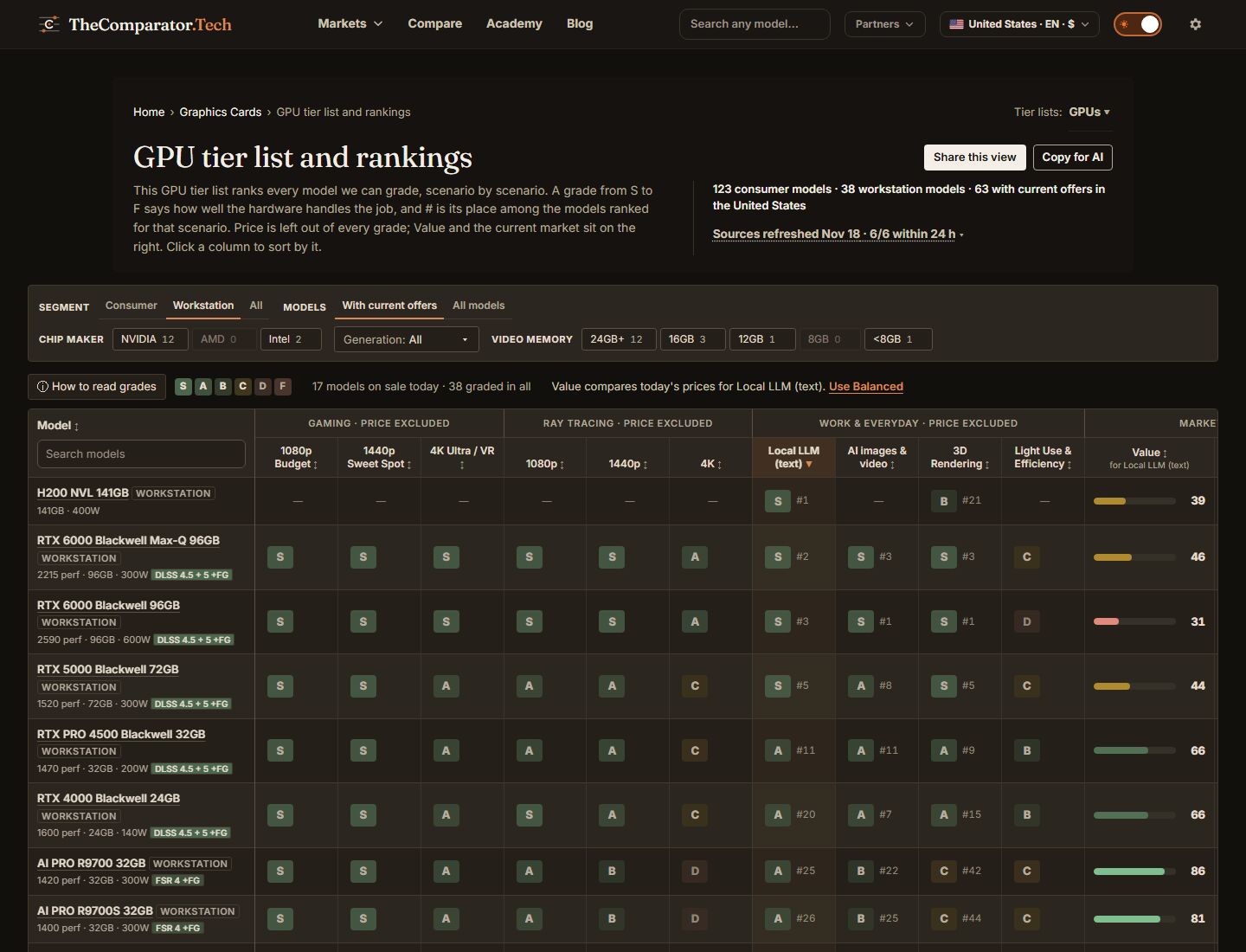
Can you game on a pro card? Yes. On the regular driver an RTX PRO 6000 Blackwell runs about 11-14% faster than an RTX 5090 at 4K, a Radeon AI PRO R9700 behaves like an RX 9070 XT with 32 GB, and an Arc Pro B70 lands close to an RTX 5060 Ti 16 GB [source: der8auer, Gamers Nexus, PCGH, Tom’s Hardware]. You pay for memory and certification, not frames, and blower coolers are loud. Our tier list grades desktop pro cards in the gaming columns on the same rubric but gives them no rank number there; data-center cards have no display outputs and are not graded for gaming.
Watch: der8auer’s gaming test of the RTX PRO 6000 Blackwell against the RTX 5090 and RTX 4090 is embedded in Tom’s Hardware’s write-up.
6. NVIDIA, AMD, Intel: what each brings, and where each hurts
All three vendors make capable hardware. The differences that matter for AI are mostly in software: how many AI tools run on the card on day one, and how much work it takes to make the rest run. Here is what each brings and where each hurts.
6.1 NVIDIA
- Strengths: CUDA and its libraries (cuBLAS, cuDNN, CUTLASS, TensorRT) are what almost all AI software is written for first. Tensor cores with FP8 (Ada, Blackwell) and FP4 (Blackwell) formats. New models and tools work on day one; old cards stay supported for years (Pascal-era cards still run llama.cpp on CUDA 12).
- Weaknesses: price per GB of VRAM, especially now; 16 GB on cards up to the RTX 5080; the 12V-2x6 power connector on high-end cards needs a proper cable and power supply; Pascal and Volta are dropped from CUDA 13, so new PyTorch/vLLM no longer installs on them.
6.2 AMD
- Strengths: VRAM per dollar (24 GB RX 7900 XTX, 32 GB Radeon AI PRO R9700, 48 GB PRO W7900); Vulkan text generation as fast as CUDA per GB/s (§4.1); ROCm 7.x on Linux is a working stack for llama.cpp, PyTorch and ComfyUI, updated roughly every six weeks.
- Weaknesses: prompt reading 2-3× slower than NVIDIA at equal bandwidth; ROCm supports a short list of chips - consumer RDNA2 is unofficial and older data-center chips (MI50) were dropped; on Windows, ROCm covers only some cards and tools; FP8 and optimized server kernels lag on consumer RDNA4; new architectures reach official support 30-90 days after launch.
6.3 Intel
- Strengths: the lowest price per GB of new VRAM (Arc B580 12 GB; Arc Pro B60 24 GB; B65/B70 32 GB); a good Vulkan driver; vLLM support through Intel’s own llm-scaler containers for Arc Pro.
- Weaknesses: the youngest software stack. Intel archived its IPEX-LLM project in January 2026, so many older guides point to a dead end [source]; Ollama on Arc still needs workarounds; the first-generation Arc (Alchemist) uses only about a third of its bandwidth for text; Resizable BAR must be enabled.
6.4 Technology limits side by side
| NVIDIA | AMD | Intel | |
|---|---|---|---|
| Matrix units in software | Tensor cores, everything optimized | WMMA (RDNA3), better in RDNA4; less coverage | XMX in hardware; partial use in llama.cpp |
| Low-precision formats (FP8, FP4, AWQ, GPTQ) | all | FP8 on RDNA4 with patches | only where XPU kernels exist |
| Flash attention | built in | ROCm versions lag | partial |
| New architecture support | launch day | 30-90 days | depends on Intel’s team |
| Supported GPU list | everything from Turing (Pascal on older CUDA) | short list of gfx IDs | Arc A/B, Arc Pro |
6.5 Does the board partner matter?
For AI, the brand on the box (ASUS, MSI, Gigabyte, Sapphire, PNY…) does not change speed. It changes cooling and noise under hours of load, size (will two fit?), power connectors, warranty, and - for multi-GPU builds - whether the card is a blower design that exhausts heat out of the case. Memory temperatures matter on GDDR6X cards (RTX 3090): check them, and consider repadding a used card.
7. Why the community steers people away from AMD and Intel for AI - case by case
Our first draft of this research said “the vendor doesn’t matter”. That is true for exactly one thing: single-user text generation speed. For almost everything else it is wrong. The community’s advice is not “AMD and Intel are slow” - it is “you will spend time getting things to work, and some things won’t”. Here is where that is true and where it is not.
7.1 Chat with a local model - mostly fine
Through Vulkan builds (LM Studio, llama.cpp), AMD and Intel run chat models at bandwidth-matched speed. Trouble starts when a beginner follows a typical tutorial written for CUDA or ROCm. A classic case: an RX 6750 XT owner found ROCm does not officially support the chip and had to spoof the GPU ID with an environment variable - the same card works out of the box via Vulkan. On Intel, Ollama needs a bridge or the newest builds; the IPEX-LLM route that most guides recommend was archived in January 2026 [source: techtactician].
7.2 Agents, coding, long documents - noticeably slower
Prompt reading dominates here (§4.2), and AMD reads prompts 2-3× slower than NVIDIA at the same bandwidth. On a Strix Halo mini-PC, vLLM ran without flash attention at 10-11 tokens/s until a later vLLM release added a fix - the hardware was capable, the software was not there yet.
7.3 Serving a team - an engineering project
- AMD RDNA4 (RX 9070 XT, R9700): FP8 needs patches, AMD’s optimized server kernels do not run on consumer RDNA4, and in one test llama.cpp via Vulkan gave 62 tokens/s while vLLM on ROCm gave 48.
- Intel Arc Pro: vLLM works best through Intel’s own Docker images; mainline vLLM had a kernel bug that made one popular model repeat its first answer [source: bentech]. Multi-card B70 setups have hit driver faults under tensor parallelism [source: vLLM issue #41663], and users report models that will not load at all in Intel’s fork [source: vLLM forum]. When it works, it scales: Intel and the vLLM team show 4× B60 serving gpt-oss-120b [source: vLLM blog].
- NVIDIA: any model on release day, every format, TensorRT-LLM.
7.4 Images and video - the sorest point
AMD’s ROCm 7.1.1 made ComfyUI up to 2.6× faster on SDXL, 5.2× on FLUX schnell and 5.4× on Wan 14B compared with ROCm 6.4, and ComfyUI Desktop now installs with ROCm on Windows [source: AMD, Gigazine, ComfyUI blog]. That is real progress - and it also shows how far behind the old path was. Users still report crashes on fresh installs, AMD’s own notes list intermittent failures running Wan 2.1 14B on RX 9070 GRE and R9700 [source: ROCm docs], and many ComfyUI custom nodes (video, attention accelerators, quantization) are CUDA-only.
7.5 Training and fine-tuning - NVIDIA
Unsloth, bitsandbytes, flash attention and DeepSpeed are CUDA-first; AMD support comes through forks that lag; Intel’s is narrower. Community advice is unanimous here.
7.6 Multi-GPU, Windows, old hardware
NVIDIA tensor parallelism in vLLM is routine; AMD’s is rougher; Intel’s is the newest. On Windows, NVIDIA behaves the same as on Linux, while AMD and Intel AI stacks are partial. Old NVIDIA cards stay usable for years; ROCm drops older chips quickly, which also hurts resale.
7.7 Who should buy AMD or Intel for AI anyway
- You want a big model at home on a budget for chat or coding by one person: Radeon AI PRO R9700 32 GB, two RX 7900 XTX, Arc Pro B60/B65/B70 - run llama.cpp on Vulkan.
- You run Linux and enjoy tinkering: ROCm 7.x on RDNA4 is a real stack now.
- Gaming comes first, AI is a hobby: an RX 9070 XT games better than an RTX 5060 Ti, and Vulkan chat is fine.
Not recommended when image/video generation is the main job, for training, for a team server, for Windows users who do not want to troubleshoot, or if you need new models on release day.
On our tier list the AI grades stay vendor-neutral where the physics is vendor-neutral (text speed), include the vendor gap where it is measured (prompt reading for agents, images, video), and AMD/Intel cards carry a visible note rather than a hidden penalty. Their video grades are marked provisional until there are measurements on ROCm 7.
8. How good are local models, really?
Hardware only matters if the model on it is good enough for your work. This chapter answers the question people ask after “will it run?”: will it be any good?
8.1 The honest picture (November 2026)
- The open-model leaders - Kimi K3.x, GLM-5.x, DeepSeek V4, MiniMax M2.5/M3 - compete with closed flagships on public benchmarks, but they are hundreds of billions of parameters: server hardware, not a desktop [source: benchlm.ai, theairankings].
- The models that fit one consumer card (Gemma 4 31B, Qwen 27B-class, gpt-oss-20b) are strong everyday assistants and decent coders, a step behind paid assistants on hard reasoning and long agent runs.
- The sweet spot for a serious home setup is 80-120B mixture-of-experts (gpt-oss-120b, Qwen3-Coder-Next, Mistral Small 4) on 64-128 GB of memory: near-frontier on many tasks, and fast because only 3-6B parameters are active per token.
Coding is the clearest example, because there is a widely used test for it. SWE-bench Verified gives a model real bugs from open-source projects and counts how many it fixes on its own - close to what a coding agent does for you. Higher is better [source]:
| Model | Fits | SWE-bench Verified |
|---|---|---|
| gpt-oss-20b | 16 GB | ~45-61% (estimates vary) |
| gpt-oss-120b | 64-128 GB | ~62% |
| Qwen3-Coder-Next (80B MoE, 3B active) | ~46 GB, or 24 GB + RAM offload | ~70.6% |
| Qwen 27B-class (dense) | 24-32 GB | ~77% |
| Closed: Claude Sonnet 4.5 (for reference) | cloud | ~77% |
| Open leaders (MiniMax M2.5, GLM-5) | server | 77-80% |
The pattern: the more memory you have, the closer you get to the closed models. A single 24-32 GB card already reaches last year’s paid assistants on this test. But benchmarks flatter local models in agent use: reliable tool calling over long sessions is harder than a test suggests, and published numbers for the same model sometimes disagree (we saw one model listed at both 58.7% and 70.6% - the lower figure belonged to a different model). Check the model card.
8.2 Quantization: how much quality do you lose?
Quantization (storing weights with fewer bits) is what makes big models fit on home cards, so it is worth knowing what it costs. The losses below come from two kinds of test: perplexity, which measures how surprised a model is by real text (closer to the original model is better), and scores on real tasks such as coding and reasoning.
| Format | Size vs 8-bit | Typical quality loss |
|---|---|---|
| Q8_0 | 100% | none measurable (perplexity +0.008 on a 7B model) |
| Q6_K | ~78% | minimal |
| Q5_K_M | ~67% | under ~1-2.5% on 7-32B models - the sweet spot |
| Q4_K_M | ~57% | ~2-2.5% on 32B+, more on small models (a 4B model lost 6% on a coding test) |
| Q3_K_M | ~47% | 4-11% - the cliff |
| Q2_K | ~37% | unusable for code |
Sources: ai-muninn (RTX 5090 perplexity/KL test), bestllmfor (Q4/Q5/Q8 task tests), techplained. Rules of thumb: don’t go below Q4_K_M; prefer a bigger model at 4-bit over a smaller one at 8-bit; use K-quants or importance-matrix (IQ) quants, never legacy Q4_0.
Formats you will meet outside GGUF. GGUF quants (Q4_K_M and friends) are what llama.cpp, Ollama and LM Studio use: weights are stored in small blocks at about 4-6 bits and turned back into 16-bit numbers for the math. Servers and image tools use other formats, and their names describe two things: W for the weights and A for the activations, the intermediate numbers the math works on.
| Format | Weights / activations | What it gives | Runs natively on | Typical engines |
|---|---|---|---|---|
| GGUF Q4_K_M | ~4.8-bit blocks / 16-bit | small files, runs anywhere | any GPU or CPU | llama.cpp, Ollama, LM Studio |
| W4A16 (AWQ, GPTQ, “INT4”) | 4-bit / 16-bit | ~4× less memory than FP16, good quality | any modern GPU, through special kernels | vLLM, SGLang, TensorRT-LLM |
| W8A8 (INT8) | 8-bit / 8-bit | half the memory, faster math | INT8 matrix units: RTX 20 and newer, RDNA 3 and newer, Arc | vLLM, TensorRT-LLM |
| FP8 (E4M3) | 8-bit float / 8-bit float | like INT8, usually closer to the original | RTX 40, RTX 50, RDNA 4 | vLLM, ComfyUI, TensorRT |
| W4A8 | 4-bit / 8-bit | 4-bit memory with 8-bit math | INT8 or FP8 matrix units | vLLM, Strata |
| NVFP4 | 4-bit float in blocks of 16, each with an FP8 scale | the smallest and fastest format with tolerable loss | RTX 50 and other Blackwell cards only | TensorRT, ComfyUI, vLLM, Strata |
| MXFP8 / MXFP4 | 8- or 4-bit float in blocks of 32 sharing one power-of-two scale | open (OCP) block formats | Blackwell; MXFP4 models such as gpt-oss also run elsewhere in software | TensorRT, vLLM, llama.cpp (MXFP4) |
Three rules follow. The formats are not interchangeable: a Q4_K_M file, an AWQ “INT4” model and an NVFP4 model are three different files, made with different tools for different engines, and they lose different amounts of quality. Hardware support is not the same as use: an RTX 5090 has FP4 units, but llama.cpp running a GGUF file does not use them; only an NVFP4 model in an engine with NVFP4 kernels does. Faster is not always better: Strata’s developers measured prompt reading on one model at 1,905 tokens/s in FP16, 2,503 in W4A8 and 2,904 in W4A4, and made W4A8 the default because W4A4 drifted about 4.5× further from the full-precision answers for 16% more speed [source: Strata NVFP4 notes]. Image and video models follow the same logic: the FP8 builds of FLUX and the INT8 and NVFP4 builds of LTX-2.5 are what make them fit on home cards.
8.3 Choosing a model for your job
- Everyday private assistant: the biggest 12-32B instruct model your VRAM fits at Q4-Q5.
- Coding help in the editor: a Qwen coder sized to your card; for agents, the strongest model you can fit, plus a hosted model for hard tasks.
- Document Q&A (RAG): model quality matters less than retrieval quality and a long, actually working context - test it at your real document length.
- Images: SDXL for speed and ecosystem, FLUX for quality (check its licence), Qwen-Image and FLUX.2 if you have the memory.
9. Builds: from a first card to a team server
Builds are grouped by how much video memory they give you, because memory decides which models you can run (§4.3) and everything else follows from that. For each one you get the cards that fit the group, what they run, where they hit their limits, and the grade to look for on our tier list. Card prices change daily, so check them in our GPU comparison.
9.1 First steps: 8-12 GB
- Cards: RTX 3060 12 GB, RTX 5060/5070, Arc B580, RX 9060 XT.
- Runs: 7-14B chat at 30-100 tokens/s; SD 1.5 and SDXL; FLUX only quantized and slowly.
- Limits: no 27B+ models; 8 GB cards crash on SDXL at default settings. Grade target: Local LLM B.
9.2 Home workstation: 16 GB
- Cards: RTX 5060 Ti 16 GB (cheapest NVIDIA), RTX 5070 Ti (fast, A/A), RX 9070 XT (A for text), RX 9060 XT 16 GB.
- Runs: up to ~20B dense or 20-35B MoE with expert offload; FLUX FP8 comfortably; small video models.
- Limits: 32B dense does not fit. Best single-card balance for text + images today: RTX 5070 Ti.
9.3 Enthusiast: 24-32 GB
- Cards: used RTX 3090 (A/B), RTX 4090 (S/S), RTX 5090 (S/S), RX 7900 XTX (A/B), Radeon AI PRO R9700 32 GB (A/B), Arc Pro B60/B65/B70.
- Runs: 27-32B models at 25-65 tokens/s; FLUX at full precision; Wan 14B video with offloading.
- Notes: a used 3090 needs a memory-temperature check and often new thermal pads; a 5090 wants a 1,000-1,200 W ATX 3.1 supply and a native 12V-2x6 cable - capping it at ~450 W costs almost no text speed, because text is bandwidth-bound.
9.4 Professional / office desk
- Cards: RTX PRO 4000/4500/5000/6000 Blackwell, Radeon AI PRO R9700.
- Why: 24-96 GB, blower or quiet coolers, certified drivers, ECC memory on some, made for 24/7. An RTX PRO 5000 (48 GB) runs a 70B model in 4-bit on one card; an RTX PRO 6000 (96 GB) runs 120B-class MoE entirely in VRAM. They also game (§5.4).
9.5 Two or more cards
- What you gain: memory. Two 24 GB cards hold a 70B model at 4-bit.
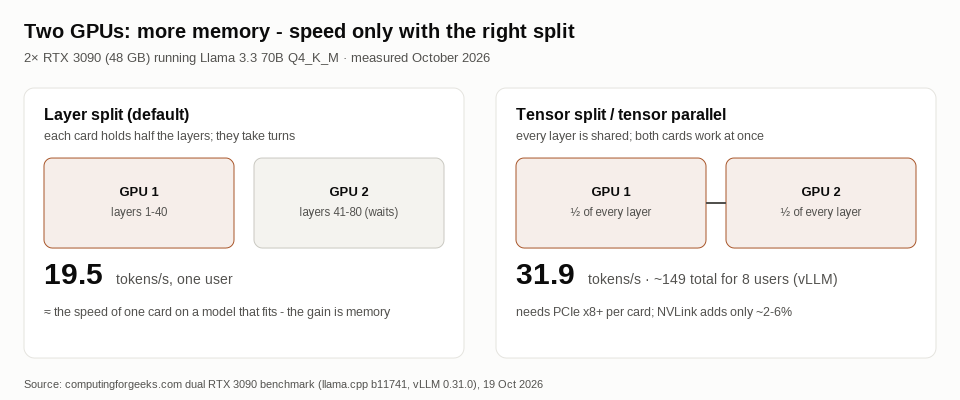
- Real numbers, 2× RTX 3090, Llama 3.3 70B Q4_K_M [source: computingforgeeks, Oct 2026]: 19.5 tokens/s with the default layer split, 31.9 with tensor split; vLLM tensor parallel 31.3 tokens/s for one user and ~149 tokens/s in total for eight users.
- Rules: a motherboard that gives each card at least PCIe x8; blower cards or open frames for airflow; enough power with headroom for spikes; don’t mix vendors for one model; NVLink barely matters for inference (2-6% in tensor parallel, ~0 in layer split).
- Myth check: “two RTX 4090 run 70B at 100 tokens/s” or “a 5090 runs 70B at 45 tokens/s” fail simple arithmetic - 70B at 4-bit is ~40 GB, which does not fit 32 GB, and two 4090s top out near ~50 tokens/s even in theory.
Two 16 GB cards or one 24 GB card? At our catalog prices on 18 November, two RTX 5060 Ti 16 GB cost about $1,600 together and a refurbished [RTX 3090](/en-ca/gpu/rtx-3090/) about $1,900. Two cards give 32 GB and one gives 24 GB, but each 5060 Ti reads its memory at 448 GB/s and the 3090 at 936 GB/s. Job by job (text speeds [calculated] with the §4.1 formula; image and video times [measured], §4.4):
| Job | 2× RTX 5060 Ti 16 GB (~$1,600) | Refurbished RTX 3090 (~$1,900) |
|---|---|---|
| 27-32B dense model at 4-bit (~20 GB), one user | must be split across both cards: ~16 tokens/s with layer split, ~26 with tensor split | fits one card: ~34 tokens/s |
| 70B dense at 4-bit (~40 GB) | does not fit (32 GB) | does not fit |
| 35-120B MoE with experts in RAM | 32 GB keeps more experts on the cards, if the engine splits across cards | 24 GB on one card, simpler |
| One image at a time | 37 s per FLUX FP8 image, 2.9-3.4 it/s SDXL (one card works) | 23 s per FLUX FP8 image, ~4.2-4.5 it/s SDXL |
| Image batches, two cards busy | about 18-19 s per image overall | 23 s per image |
| Video, Wan 2.2 720p, 5 s | 605 s per clip on each card, two clips at once | 648 s per clip |
| Two separate jobs (chat + images, two people) | one job per card | the jobs share one card |
| Power at full load | ~360 W (2 × 180 W) | ~350 W |
| Setup | two slots with at least PCIe x8 each, bigger case, more to go wrong | one card |
The single 3090 wins for one person chatting or coding with a 27-32B model: about twice the speed, and nothing to configure. The two 5060 Tis win when two jobs run at once, for image and video batches, when a large MoE needs 32 GB, and for FP8/FP4 formats that only newer cards run natively - and they are new cards with a full warranty, against a five-year-old one. Neither runs a dense 70B model. Most image and video workflows use one card per job; splitting one image across two cards is not something to plan on.
9.6 The mini node (compact AI box)
For a quiet 24/7 machine with lots of memory [source], using gpt-oss-120b (MoE) as the reference:
| System | Memory / bandwidth | Generation | Prompt reading |
|---|---|---|---|
| NVIDIA DGX Spark (GB10) and clones | 128 GB / ~273 GB/s | ~59 t/s (43 at 32K context) | ~2,400 t/s |
| AMD Ryzen AI Max+ 395 (Strix Halo) mini-PCs | 128 GB (≈96 GB to GPU) / ~215 GB/s | ~49-55 t/s | ~460-720 t/s |
| Apple Mac with M5 Max / Studio | up to 128 GB+ / ~600 GB/s | ~88 t/s | ~1,300 t/s |
| DIY: 3× used RTX 3090 | 72 GB / 3× 936 GB/s | ~124 t/s | - |
Mini nodes win on memory per watt and per dollar, silence and size; they are poor at dense 70B models (a DGX Spark generates ~2.7 tokens/s on Llama 3.1 70B FP8) and fine for MoE. The Spark leads on prompt reading and multi-user serving thanks to CUDA; Macs lead on generation speed thanks to bandwidth. Compact discrete options: RTX PRO 4000 SFF / RTX 4000 SFF Ada / RTX 2000 Ada in a small case.
9.7 A server for a team or office
vLLM or SGLang serve many people at once from one model - total throughput grows several-fold with concurrent users (§9.5). Size by: the model class you need (memory), the number of simultaneous users (KV-cache memory), and whether data may leave the building. Typical choices: 2-4 × 24-32 GB cards for 10-30 users on a 30-120B model; an RTX PRO 6000 or data-center cards beyond that. Budget for someone to maintain it.
9.8 The rest of the PC
The CPU barely matters if the model is fully in VRAM; it matters when layers or experts are offloaded to system RAM (then fast DDR5 and more channels help). Plan system RAM at least equal to VRAM (more for MoE offload), a fast NVMe SSD for loading 20-60 GB models, and a power supply with 30% headroom. Our CPU, RAM, SSD, motherboard and PSU tier lists cover these parts.
10. Five ways to get AI: buy a card, rent one, pay per token, subscribe, or run agents
A graphics card is only one way to get AI work done. You can also rent someone else’s card by the hour, pay a provider per word the model reads and writes (an API), pay a flat monthly subscription, or let an agent work for you on a subscription or API. Each has a different cost structure: a card is a big payment up front and almost nothing per use; the others cost nothing up front and something every time. Which is cheaper therefore depends on how much you use AI - so this chapter prices all five, then works through four typical users. All figures below are US dollars, checked in November 2026; card prices are the cheapest new listings in our US catalog on 18 November 2026; every input is listed with the calculation [calculated].
10.1 Your own card
What you pay: the card (minus what it sells for later), electricity, and your time to set it up. What you get: unlimited use, privacy, offline work, any model you like, fine-tuning, and - for a consumer card - games on the same hardware.
Late 2026 is an expensive moment to buy: the memory shortage has pushed street prices far above launch prices. The RTX 5090 (launch price $1,999) is the extreme case: the lowest *listing* in our catalog and on price trackers was $5,500, but the cheapest card actually in stock from a major store was about $6,200-6,550 in mid-November, price trackers put the typical price around $6,900-7,400, and some reports cite more than $9,000 **[source, 3-18 Nov 2026]**. A listing price is not a purchase price - check stock. Elsewhere in our catalog on 18 November: the cheapest new RTX 4090 $4,500, a new RTX 5070 Ti $1,410, an RTX 5060 Ti 16 GB $800, an Arc B580 $330, a Radeon AI PRO R9700 (32 GB) $2,000, and a refurbished RTX 3090 about $1,900. Check today’s prices in our GPU comparison - they change daily.
Electricity is the small part. A card rated at 300 W does not draw its full rating all the time; during AI work we assume it averages about 80% of it, i.e. 240 W (text generation often draws less, image generation close to the full rating). Four hours a day at 240 W is ~350 kWh a year: about $64 at the US average of 18.2¢/kWh, or ~$107 at the EU average of €0.283/kWh. At the full 300 W it would be 438 kWh: about $80 in the US and €124 (~$134) in the EU [calculated; tariffs: Eurostat H1 2026, US average H1 2026]. All electricity figures in this chapter use the same 80% assumption.
10.2 Renting a GPU by the hour
Marketplaces and GPU clouds rent the same cards per second or per hour [source, Aug-Oct 2026]:
| GPU | Marketplace (cheapest) | Managed cloud (typical) |
|---|---|---|
| RTX 3090 24 GB | ~$0.22 | ~$0.39 |
| RTX 4090 24 GB | $0.16-0.34 | $0.69-0.89 |
| RTX 5090 32 GB | $0.20-0.40 | median ~$0.65 |
| A100 80 GB | ~$1.19-1.39 | ~$1.79-1.89 |
| H100 80 GB | ~$1.99 | $2.89 (PCIe) - $4.39 (SXM); AWS ≈ $6.88 |
Watch for: storage that keeps billing while a machine is stopped, serverless rates that cost more than a rented pod, and setup time at the start of each session. Rental prices also rise - the RTX 5090 median went up by 17-35% over 90 days on two price trackers.
When does buying beat renting? Spread the card’s price over three years, subtract its electricity per hour from the rental rate, and divide: the result is how many hours a day the card must work, every day, before owning is cheaper [calculated]. The table and the chart below show the same five comparisons; the first number assumes the card is worth nothing after three years, the second that you sell it for 40% of its price. The RTX 3090 price is the cheapest refurbished offer in our catalog:
| Card (price) vs rental | No resale value | Sells for 40% after 3 years |
|---|---|---|
| RTX 5090 ($6,550, in stock) vs $0.65/h | 11.7 h/day, every day | 7.0 h/day |
| RTX 5090 ($7,400, typical) vs $0.65/h | 13.3 h/day | 8.0 h/day |
| RTX 4090 ($4,500) vs $0.69/h managed | 7.1 h/day | 4.3 h/day |
| RTX 4090 ($4,500) vs $0.34/h marketplace | never (17.9 h/day) | 10.7 h/day |
| Refurbished RTX 3090 ($1,900) vs $0.22/h | 12.9 h/day | 7.7 h/day |
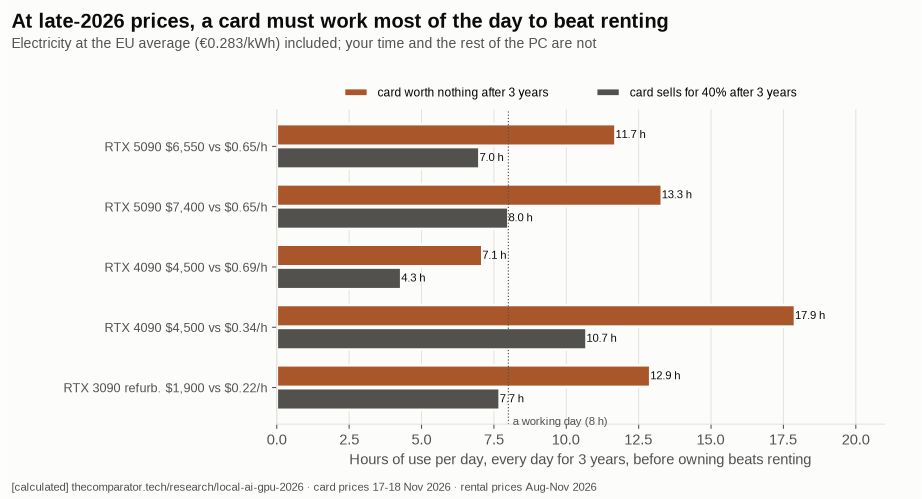
At today’s card prices, owning beats renting the same card only if it works for several hours every day for three years. Renting is also the right way to try a class of card before buying: an hour on an RTX 5090 costs less than a coffee.
10.3 Paying per token (API)
An API lets you send text to a model running in someone’s data center and pay only for what you use, counted in tokens (pieces of words; one million tokens is roughly 750,000 words). Hosted open models are startlingly cheap. Llama 3.3 70B costs $0.10-0.23 per million input tokens and $0.32-0.40 per million output tokens on the cheapest provider; mid-market providers charge about $0.88-1.04; the fastest (Groq) about $0.59/$0.79 at 250+ tokens/s [source, May-Nov 2026]. Frontier closed models cost roughly ten times more per token.
Image APIs: FLUX.1 [dev] is about $0.025 per 1024×1024 image on the main hosts; FLUX.1 [schnell] about $0.003 [source, Sep 2026].
10.4 Subscriptions
A subscription is the familiar flat monthly fee for ChatGPT, Claude or Gemini. You get the best closed models in a polished app, with limits on how much you can use them. All three big vendors have converged on the same price steps - $20, $100 and $200 a month:
| Vendor | Tiers per month | Notes |
|---|---|---|
| ChatGPT | Go $8 · Plus $20 · Pro $100 / $200 / $500 · Business $20-25 per seat | agents from Plus; Pro tiers include API credit; individual plans may be used for training unless you opt out - Business plans are not |
| Claude | Pro $20 ($17 yearly) · Max $100 (5× Pro) / $200 (20× Pro) · Team $25-125 per seat | limits reset in 5-hour windows plus weekly caps; Claude Code on a subscription draws from the same allowance |
| Google AI | Plus $7.99 · Pro $19.99 · Ultra $99.99 / $200 | bundled cloud storage and video generation |
| Coding tools | Copilot from $10; Cursor, Claude Code, Codex $20-200 | heavy agent users end up at $100-250/month on any of them |
Sources: vendor pricing pages as summarised by ssdnodes (10-14 Nov 2026), zenken, leanware, benchlm (Sep 2026), Engadget/the-decoder (May 2026), CloudZero.
A subscription buys the best models, polished apps, web search, voice and file handling for a fixed price. It does not buy privacy guarantees on personal plans, offline use, your own or uncensored models, unlimited image/video generation, or fine-tuning. Limits move - vendors have tightened and loosened them several times since 2025.
10.5 Agents: why they change the maths
An agent - Claude Code, Codex, Cursor’s agent mode, or an open-source one - reads your files, runs tools, checks results and loops. Most of its tokens are input (context it re-reads), not output. Typical spend [source]:
- Anthropic’s own guidance, as reported: about **$13 per developer per active day** on average, $150-250 a month, with 90% of users under $30 a day.
- A heavy user’s eight months of daily agent work came to ~10 billion tokens - over $15,000 at API prices, against $100 a month on a subscription (one developer’s account; indicative).
- One developer’s 30-day bills: a $200 subscription vs ~$165 for a $20 plan plus API usage vs ~$87 for a cheaper editor plus API overflow; the $200 plan won from about three hours of agent work a day.
Can a home GPU run a good agent? Partly. Open coding models that fit one 24-32 GB card (Qwen 27B-class) score in the high 70s on SWE-bench Verified; Qwen3-Coder-Next (80B MoE, ~70.6%) needs ~46 GB or a 24 GB card plus system-RAM offload; gpt-oss-120b (~62%) needs 64-128 GB [source]. Benchmarks overstate how smoothly these models drive real agent tools - reliable tool-calling over long sessions is where local models still trail [source] - and agents punish slow prompt reading (§4.2). A practical setup is hybrid: a local model for private code and routine tasks, a subscription for the hard ones.
10.6 Four profiles, five options, one year [calculated]
Before the numbers, one caveat that matters as much as the money: the options do not buy the same quality. A $20 subscription gives you the best closed models; a local 14B model on a 16 GB card is noticeably weaker on hard questions; a local 27-32B or 120B model closes much of the gap. So compare the costs, then read the “Notes” column and the verdict: they say what you get for the money, not just what you pay.
Assumptions used throughout: a card is used for three years; its price is spread evenly and it is worth nothing at the end (if you resell for ~40%, cut its yearly cost by 40%); the card averages 80% of its rated power while working; electricity at the EU average; rented sessions cost 25% extra for setup time; a chat message is ~3,000 tokens read and ~600 written.
Prices only mean something against real use, so here are four typical users and what a year costs each of them with every option. To compare a one-off purchase with monthly fees, the card’s price is spread over three years and we assume it is worth nothing at the end (if you sell it for ~40%, the card gets correspondingly cheaper). Electricity is at the EU average. Read the verdicts as much as the numbers: the cheapest option is not always the right one.
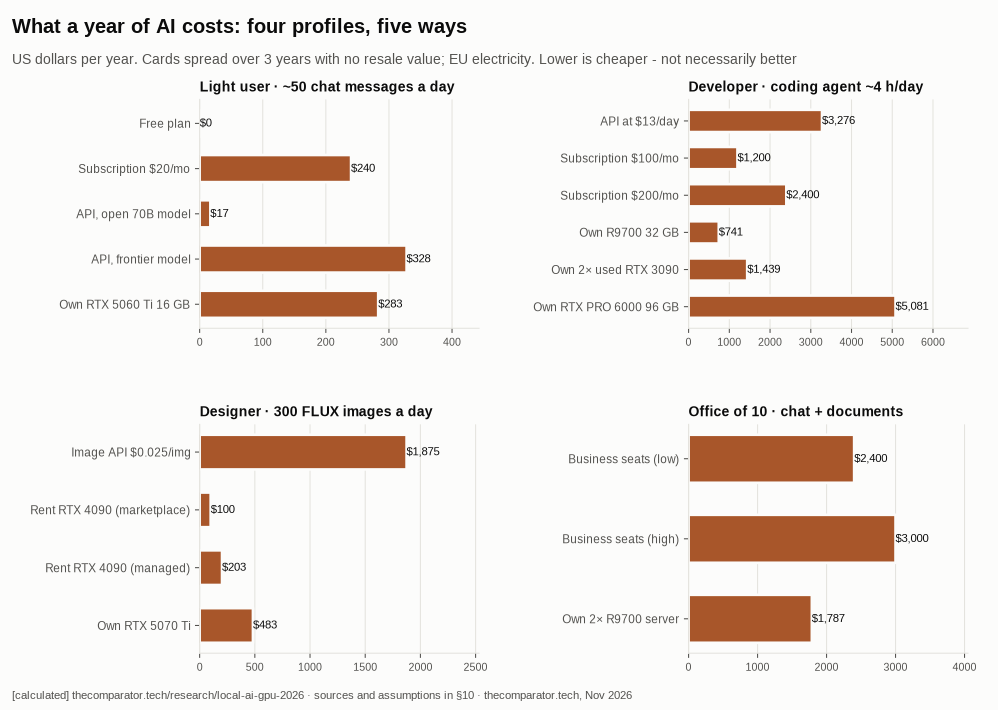
A. Light user - ~50 chat messages a day
| Option | $/year | Notes |
|---|---|---|
| Free plan | 0 | limits, older models at peak times |
| Subscription | 240 | best models |
| API, open 70B model | ~17 | needs a chat app that takes an API key |
| API, frontier model ($3/$15 per M tokens) | ~330 | |
| Own RTX 5060 Ti 16 GB ($800) | ~283 | 14B-class model; private; also games |
Verdict: subscription or free plan. Buy a card only for privacy or because you also game.
B. Developer using a coding agent ~4 h on 252 working days
| Option | $/year | Notes |
|---|---|---|
| API at the typical $13/day | ~3,280 | up to ~7,560 at $30/day |
| Subscription $100 / $200 | 1,200 / 2,400 | strongest models, limits |
| Own Radeon AI PRO R9700 32 GB ($2,000) | ~740 | 27-32B models; weaker agent |
| Own 2× used RTX 3090 ($3,800) | ~1,440 | fits 80B-class MoE coder with offload |
| Own RTX PRO 6000 96 GB ($14,800) | ~5,080 | runs 120B-class models fully in VRAM |
Verdict: a subscription is the best value for code that may leave your machine. Local wins only when code must stay private - and then as a complement, not a replacement.
C. Designer - 300 FLUX.1 [dev] images a day, 250 days
| Option | $/year | Notes |
|---|---|---|
| Image API ($0.025/image) | ~1,875 | no setup |
| Rent an RTX 4090 ($0.34-0.69/h, +25% session overhead) | ~100-200 | setup each session; storage fees |
| Own RTX 5070 Ti 16 GB ($1,410) | ~480 | ~8 s/image [estimate]; LoRAs, privacy, unlimited |
Verdict: renting is cheapest on paper; owning wins on convenience, unlimited iteration and LoRA training, and pays for itself against the API in under a year. Check the model licence for commercial work (§3.2).
D. Office of 10 - chat plus questions over internal documents
| Option | $/year | Notes |
|---|---|---|
| Business/Team subscription, 10 seats | 2,400-3,000 | admin, no training on your data |
| Own server: 2× Radeon AI PRO R9700 (64 GB, $4,000), on 24/7 | ~1,790 | runs 120B-class MoE; plus someone’s time to run it |
Verdict: close on money. Choose by data rules: if documents may not leave the building, a local server; otherwise a business plan is less work.
10.7 What money does not capture
- Privacy and compliance. A local model never sends data anywhere. Business plans promise not to train on your data; personal plans may by default.
- Availability. Local works offline and is never rate-limited. Clouds change limits and models without asking.
- Control. Locally you pin a model version, use uncensored or fine-tuned models, and keep outputs reproducible.
- Quality. The best closed models are still ahead on hard reasoning and long agent tasks.
- Dual use. A consumer card also games and edits video; a subscription does not.
11. Setting it up: from a new card to a working system, step by step
This chapter takes you from “the card is in the PC” to “a model answers me, and I know it runs at the speed it should”. Pick the path that matches what you want. Paths A and B need no command line at all; C, D and E are for apps, agents, images and teams. Each path ends with a check, because the most common problem in local AI is not a bad card - it is a model silently running on the CPU.
11.1 Before you start: a five-minute checklist
- Power. Check the card’s recommended power supply on the maker’s page and add about 30% headroom if you will run long jobs. High-end NVIDIA cards (RTX 4090/5090, RTX PRO 6000) use the 12V-2x6 connector: use the cable that came with an ATX 3.1 power supply or the adapter from the box, push it in until it clicks, and don’t bend it sharply near the plug.
- BIOS. Update the motherboard BIOS, then enable Above 4G Decoding and Resizable BAR (sometimes called Smart Access Memory). Intel Arc cards lose a lot of speed without it; for the others it does no harm.
- Disk. Models are big files: plan 100-200 GB free on an NVMe SSD. Loading a 20 GB model from a hard drive takes minutes instead of seconds.
- System memory. At least as much RAM as VRAM, and more if you want to run mixture-of-experts models that spill experts into RAM (§12.1).
- Operating system. Windows 11 is fine for chat and images on all three vendors. Choose Linux (Ubuntu 24.04 LTS is the best-supported) if you plan to serve a team, use AMD ROCm beyond chat, or use Intel’s server tools.
11.2 Path A - chat in ten minutes with LM Studio (any vendor, Windows, Mac, Linux)
LM Studio is a desktop app that finds, downloads and runs models. It uses CUDA on NVIDIA and Vulkan on AMD and Intel, so it is the least troublesome start for every vendor.
- Install the graphics driver. NVIDIA: the current Game Ready or Studio driver. AMD: the current Adrenalin driver. Intel: the current Arc driver. Restart.
- Install LM Studio from lmstudio.ai and open it.
- Choose a model that fits. Rule of thumb: the model file should be no larger than about 80% of your VRAM, so the conversation still fits next to it. Good first picks by card:
| Your VRAM | First model to try | Why |
|---|---|---|
| 8 GB | an 8B instruct model, Q4_K_M (~5 GB) | fits with room for a long chat |
| 12 GB | a 12-14B model, Q4_K_M (~9 GB) | the best quality that still fits |
| 16 GB | gpt-oss-20b, or a 14B model at Q6 | 20B MoE is fast and capable |
| 24 GB | a 27-32B model, Q4_K_M or Q5_K_M | the sweet spot for one card |
| 32 GB+ | a 32B model at Q6/Q8, or bigger MoE | headroom for long documents |
- Load it with full GPU offload. In the model settings set “GPU offload” to the maximum, context length to 8,000-16,000 tokens to start, and turn on Flash Attention if it is offered.
- Check it really runs on the GPU. Ask a question and look at the speed LM Studio shows under the answer. Then open Task Manager → Performance → GPU (Windows) and confirm dedicated GPU memory filled up by roughly the model size. Compare the speed with the table in §4.1: if you get a fraction of the expected number, some layers are on the CPU.
- If it is slow: raise GPU offload to the maximum, lower the context length, or pick a smaller quantization. A model that does not fit is the cause nine times out of ten.
11.3 Path B - a private ChatGPT-style page for the household or office (Ollama + Open WebUI)
Install Ollama from ollama.com (Windows, Mac, Linux). It runs in the background and exposes an API on port 11434.
Download and test a model in a terminal:
ollama run gpt-oss:20b(or any model from the Ollama library that fits your VRAM). Type a question;/byeexits.Check the GPU is used:
ollama psshows each loaded model and whether it is “100% GPU”. Anything like “40% CPU / 60% GPU” means it does not fit - use a smaller model.Add a web interface. Install Docker Desktop, then run Open WebUI (one command):
docker run -d -p 3000:8080 \
  --add-host=host.docker.internal:host-gateway \
  -v open-webui:/app/backend/data \
  --name open-webui ghcr.io/open-webui/open-webui:main
Open
http://localhost:3000, create the admin account, and it finds your Ollama models. Others on your network openhttp://YOUR-PC-IP:3000, where YOUR-PC-IP is this computer’s local address (Windows:ipconfig, Linux/Mac:ip addrorifconfig).AMD and Intel note: Ollama supports many Radeon cards through ROCm and is improving on Intel, but if your card is not detected (
ollama psshows CPU only), point Open WebUI at LM Studio’s server instead (LM Studio → Developer → Start server) - it uses Vulkan and works on almost everything.
11.4 Path C - an API server for your apps and coding agents (llama.cpp)
Download a prebuilt llama.cpp release from github.com/ggml-org/llama.cpp/releases: the CUDA build for NVIDIA, the Vulkan build for AMD and Intel (HIP/ROCm and SYCL builds also exist for advanced use).
Download a GGUF model from Hugging Face (§13.1).
Start the server:
llama-server -m model.gguf -ngl 999 -c 16384 -fa on --port 8080-ngl 999puts every layer on the GPU,-csets the context,-fa onturns on flash attention.Test it: open http://localhost:8080 for the built-in chat page, or call the OpenAI-compatible endpoint at
http://localhost:8080/v1/chat/completions.Connect a coding agent: in Continue, Cline, Roo Code, Aider or OpenCode choose “OpenAI-compatible” as the provider, base URL
http://localhost:8080/v1, any API key. For agents give the server a bigger context (32,000+ tokens) if VRAM allows - agents re-read a lot (§4.2).Measure your card so you know what you have:
llama-bench -m model.gguf -p 512 -n 128“pp512” is prompt reading, “tg128” is writing speed; compare with §4.
11.5 Path D - images and video with ComfyUI
- Install ComfyUI Desktop from comfy.org (Windows and Mac). The installer asks for your GPU type: NVIDIA works out of the box; supported AMD cards get ROCm on Windows since the 2026 releases; Intel Arc needs the manual install described in ComfyUI’s README and more patience.
- Open a template (Workflow → Browse templates): start with SDXL to check everything works, then FLUX.
- Download the model it asks for - the template shows which file goes into which folder (
models/checkpoints,models/diffusion_models,models/vae…). On 12-16 GB cards use FP8 versions of FLUX. - Generate and time it. The first image is slow (models load); time the second one and compare with §3.2.
- If you run out of memory: lower the resolution or batch size, use FP8/GGUF model versions, close other GPU-heavy apps (browsers with video, games). On 8 GB cards stay with SD 1.5/SDXL.
- Check licences before commercial use (FLUX.1 [dev] distinguishes non-commercial model use from commercial rights to generated images).
11.6 Path E - a server for a team (Linux + vLLM)
Install Ubuntu 24.04 LTS, the vendor driver (NVIDIA driver, AMD ROCm 7.x, or Intel’s GPU driver), then Docker.
NVIDIA: install the NVIDIA Container Toolkit, then start vLLM, replacing MODEL-ID with the model’s Hugging Face name (for example an AWQ or FP8 version, so it fits):
docker run --gpus all -p 8000:8000 --ipc=host \
  vllm/vllm-openai:latest \
  --model MODEL-ID --max-model-len 16384
For two cards add
--tensor-parallel-size 2at the end.AMD: use AMD’s ROCm vLLM container images; on consumer RDNA4 expect to need FP16 or AWQ weights (FP8 needs patches, §7.3). For a few users, llama.cpp on Vulkan may be faster.
Intel Arc Pro: use Intel’s llm-scaler vLLM Docker images, not mainline vLLM.
Put Open WebUI in front (Path B, step 4) with the vLLM address as an OpenAI connection, so people get accounts and a familiar chat page.
Load-test before you announce it: send 5-10 simultaneous requests and watch speed and memory. Size the context limit so every expected user fits.
11.7 Two or more cards: the checklist
- Slots and lanes: each card at PCIe x8 or better (check the motherboard manual - some slots drop to x4 or share lanes with M.2 drives).
- Spacing and airflow: leave a slot gap, or use blower-style cards that push heat out of the case.
- Power: separate PSU cables for each card; budget for both cards at full power plus 30%.
- Software: llama.cpp splits automatically (
--split-mode layerby default;--split-mode rowfor tensor split;--tensor-split 24,12for unequal cards); vLLM uses--tensor-parallel-size N. Keep one vendor per model. - Check: both cards’ memory should fill (
nvidia-smi,rocm-smi,xpu-smi).
11.8 When something goes wrong
| Symptom | Likely cause | Fix |
|---|---|---|
| 1-5 tokens/s on a card that should do 30+ | part of the model is in system RAM | full GPU offload, smaller model or quant, shorter context |
| “Out of memory” when loading or mid-chat | context (KV cache) too large | lower context length; use 8-bit KV cache (-ctk q8_0 -ctv q8_0) |
| AMD card not detected by Ollama/ROCm | the chip is not on ROCm’s support list | use LM Studio or llama.cpp Vulkan; ROCm override only at your own risk |
| Intel Arc much slower than expected | Resizable BAR off, old driver | enable ReBAR in BIOS, update the Arc driver |
| Black or noisy images on AMD | early ROCm/driver combination | update ROCm/driver; switch the VAE to full precision |
| WSL2 or Docker can’t see the GPU | driver installed inside WSL, or toolkit missing | install the driver on Windows only; add the NVIDIA Container Toolkit |
| Old card (Pascal/Volta) won’t run new PyTorch/vLLM | CUDA 13 dropped these chips | stay on CUDA 12.x builds; llama.cpp still works |
| Card is hot and loud on long jobs | full power for little gain | set a power limit: an RTX 3090 at 280-300 W loses ~5% speed; an RTX 5090 at ~450 W loses little text speed |
11.9 What helps a lot, and what barely helps
- Helps a lot: a model that fits fully in VRAM (5-20× faster than spilling); 4-6-bit quantization instead of FP16 (3-4× less memory, small quality loss); for MoE models, offloading only the experts to RAM (
--n-cpu-moe); batching (vLLM/SGLang) when several requests run at once. - Barely helps: overclocking the GPU core (text speed is limited by memory); memory overclocking (+3-8%); a faster CPU when everything is already in VRAM.
12. The software stack - what runs where
| Tool | What for | NVIDIA | AMD | Intel |
|---|---|---|---|---|
llama.cpp (llama-server, llama-bench) | the engine under most local apps; GGUF; OpenAI API | CUDA | Vulkan, ROCm/HIP | Vulkan, SYCL |
| Ollama | one-command models + API | ✓ | ROCm / Vulkan | newer builds; workarounds |
| LM Studio | desktop app, model search, local server | ✓ | Vulkan | Vulkan |
| vLLM | many users, batching, FP8/AWQ | ✓ best | ROCm (patches on RDNA4) | Intel llm-scaler / XPU |
| SGLang | like vLLM, strong for agents and structured output | ✓ | ROCm | - |
| TensorRT-LLM | maximum speed on NVIDIA | ✓ | - | - |
| ExLlamaV3 | very fast single-user generation | ✓ | - | - |
| OpenVINO GenAI | Intel GPU/NPU/CPU | - | - | ✓ |
| MLX | Apple Silicon | - | - | - (Mac) |
| Open WebUI, AnythingLLM | chat interface, document Q&A | any backend | any | any |
| Continue, Cline, Aider, Roo Code, OpenCode | coding agents with a local model | any OpenAI-compatible server | ||
| ComfyUI | images and video | ✓ best | ROCm (Linux; Windows for supported cards) | partial |
| Unsloth, Axolotl | LoRA / QLoRA fine-tuning | ✓ | partial | - |
12.1 Optimizations worth knowing
- Quantization: Q4_K_M-Q6_K for llama.cpp; AWQ/GPTQ/FP8 for vLLM; NVFP4 on Blackwell.
- Context and KV cache: context costs memory per user; quantize the KV cache to 8-bit to fit more.
- Flash attention: faster and leaner attention - on by default on NVIDIA, varies elsewhere.
- Speculative decoding: a small draft model proposes tokens, the big one checks them - 1.3-2× faster on predictable text.
- MoE expert offload: keep shared layers on the GPU and push experts to system RAM to run models bigger than your VRAM.
- Batching: the single biggest win for multi-user servers.
13. Where to get models, and how to judge one for your job
13.1 Sources and formats
- Hugging Face is the primary source: original weights plus community quantizations (GGUF from
unsloth,bartowski,lmstudio-community,ggml-org; FP8/NVFP4 for vLLM fromRedHatAI,nvidia). Ollama’s library and LM Studio’s search offer the same files packaged. - Formats: GGUF → llama.cpp, Ollama, LM Studio; safetensors FP8/AWQ/GPTQ → vLLM/SGLang; EXL3 → ExLlama; MLX → Mac.
- Licences: Apache 2.0 (gpt-oss, Qwen, Mistral, Gemma 4) and MIT (DeepSeek V4, GLM-5.x) are the cleanest for commercial use; others carry their own terms. Image models differ again (FLUX.1 [dev] distinguishes non-commercial model use from commercial rights to generated images).
- Safety: prefer
safetensors/GGUF over pickle-based files; download from the original organisation or well-known quantizers.
13.2 Judge it on your own work
- Speed on your hardware:
llama-bench -m model.gguf -p 512 -n 128(pp = prompt reading, tg = generation). Comfortable: tg ≥ 20-30 t/s for chat, ≥ 50 for agents; pp ≥ 1,000 t/s for documents and code. - Quality: don’t trust one benchmark. Useful public ones: SWE-bench Verified and LiveCodeBench (code), MMLU-Pro and GPQA (knowledge), IFEval (following instructions), Arena (human preference). Better: 20-50 of your own typical tasks with known good answers, run through two or three models and quantizations (lm-evaluation-harness, promptfoo, inspect).
- Context: test at your real length; the advertised context is not always the working one.
- Memory: watch VRAM at maximum context (
nvidia-smi,rocm-smi,xpu-smi).
14. Use cases with numbers
The earlier chapters are organised by topic; real decisions are organised by people. Here the whole guide is applied to eight typical situations. Each row says who it is, what they want to do, the options worth considering (★ marks the one we would pick and why it wins), and what result to expect. The figures come from §4-§10.
| Who | Job | Options | Expected result |
|---|---|---|---|
| Student, tight budget | private study assistant, summaries | ★ free/cheap subscription; or Arc B580 / RTX 5060 Ti 16 GB if you also game | 14B model at ~30-35 t/s on 16 GB [estimate] |
| Developer, open-source work | coding agent all day | ★ $100-200 subscription; local 27B on a 24-32 GB card for quick tasks | subscription ≈ $1,200-2,400/yr vs API ≈ $3,300+ [calculated] |
| Developer, client code under NDA | agent that never leaves the machine | ★ R9700 32 GB or 2× RTX 3090 with Qwen 27B / Coder-Next; mini node 128 GB for gpt-oss-120b | 25-35 t/s on 27-32B; slower prompt reading on AMD |
| Designer / illustrator | 300 FLUX images a day + own LoRAs | ★ RTX 5070 Ti 16 GB (or 4090/5090 if budget allows); rent for peaks | ~8 s per FLUX image on a 5070 Ti [estimate]; pays back vs API in under a year |
| Video creator | short clips with Wan 2.x | ★ 24-32 GB NVIDIA; rent 48-80 GB for batches | ~4-9 min per 5-s clip on an RTX 4090 [source] |
| Small office (10) | chat + Q&A over internal documents | ★ business seats if data may leave; else 2× R9700 64 GB server with a 120B MoE | ~$2,400-3,000/yr seats vs ~$1,800/yr own server [calculated] |
| Researcher | occasional fine-tuning of 7-70B | ★ rent A100/H100 by the hour; own 24 GB for experiments | A100 ~$1.2-1.9/h, H100 ~$2-4.4/h [source] |
| Gamer, curious about AI | try local chat and images | ★ choose the gaming card with more VRAM (16 GB+) | AI is free on hardware you already use |
15. Using our tier list and GPU comparison for AI
15.1 The four AI columns
Each column name below opens the tier list sorted by that column.
- Local LLM (text) answers: which models fit, and how fast will text appear for one user? Inputs: VRAM and memory bandwidth. S needs 24 GB+ and 1,000 GB/s+.
- AI agents & long documents answers: which cards offer more memory headroom and stronger short-prompt processing? Inputs: the text grade, stricter VRAM gates (S 32 GB, A 24, B 16) and measured or estimated pp512 prompt-reading speed (S 10,000 tokens/s+). This is not a measured context capacity or full-agent benchmark. Expect it to be one letter below text on 16 GB cards and on most AMD and Intel cards (§4.5).
- AI images answers: how fast does this card generate images on its own vendor’s software? Inputs: VRAM and measured images per minute in one test (Procyon, Stable Diffusion 1.5). S needs 24 GB+ and 45 images/min+. It orders cards reliably for image work; for FLUX treat it as approximate (§4.4).
- AI video answers: does a 720p clip finish, and how long does it take? Inputs: measured seconds per 5-second Wan 2.2 clip at 720p and 480p. No tested card with 12 GB or less completed 720p; other workflows can differ. Radeon and Arc grades are provisional (software of August 2025).
- A grade is an absolute rubric, not a rank: many cards can share a grade. “Limited” confidence means the figure is estimated from measured cards (same architecture where enough references exist, otherwise same vendor), or that the grade is provisional.
- The rank number ("#17 of 480") orders cards by the capability behind the grade.
15.2 The four sets of priorities in our GPU comparison
Our GPU comparison ranks today’s offers by Value: what each card gives for its price under the priorities you choose. Each name below opens it with those priorities set; every weight can be moved.
- Local LLM (text): VRAM weight 100, bandwidth 90, price 25, warranty 50, freshness 45 (plus small weights for AI compute and power).
- AI agents & long documents: VRAM 100, bandwidth 70, prompt-reading speed 60, price 25, warranty 50, freshness 45.
- AI images: images per minute 100, VRAM 70, price 25, warranty 50, freshness 45.
- AI video: video clips per hour 100, VRAM 60, price 25, warranty 50, freshness 45. Clips per hour count a card that only finishes 480p at its 480p time × 2.6, the measured 720p/480p ratio.
- Sorting by grade now puts the strongest card of each grade first (by bandwidth, prompt-reading speed, images per minute or clips per hour), then Value. Change any weight to make it your ranking.
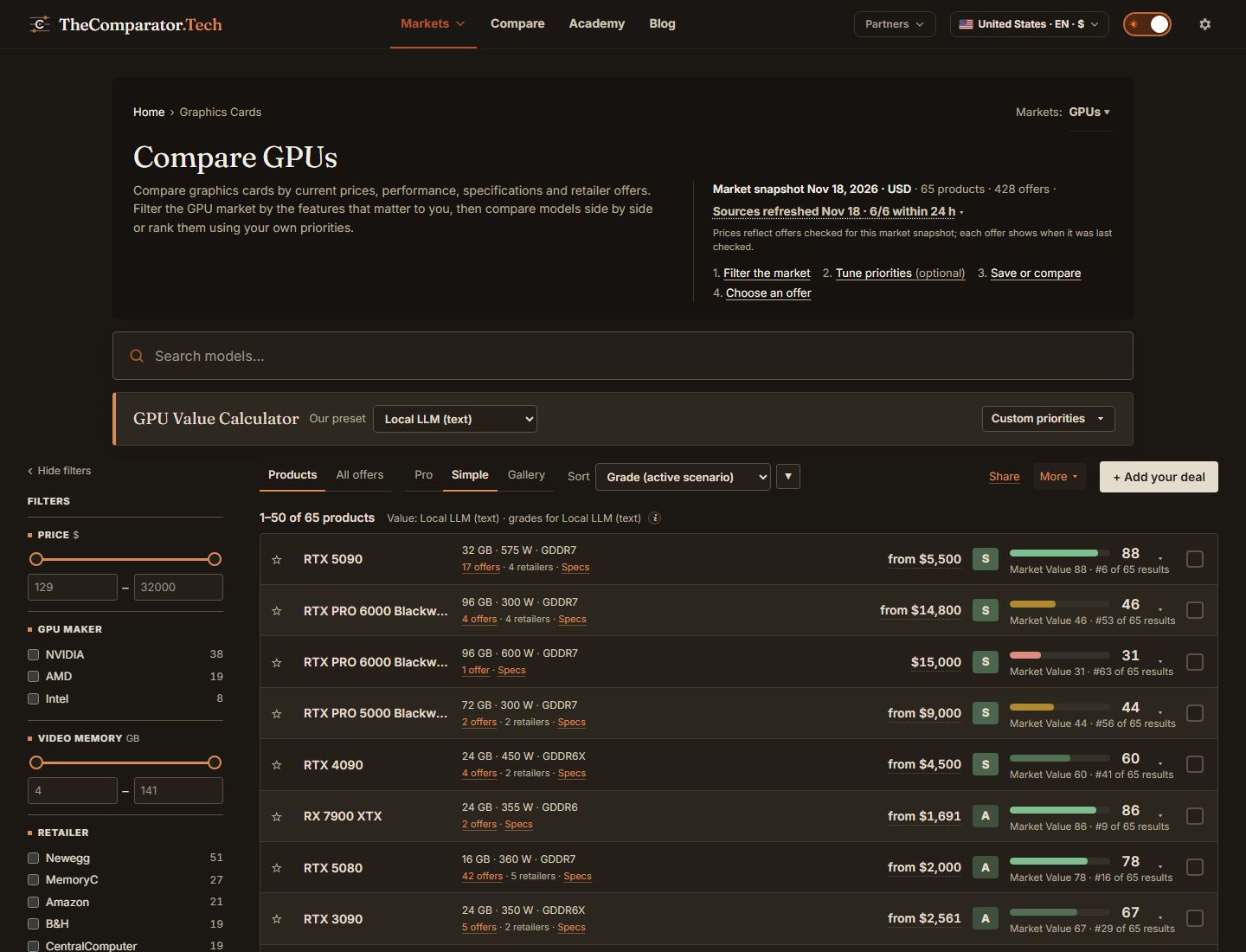
15.3 Checking a used card
Type the listing price into the price field next to the matching card in our GPU comparison: the Value updates against today’s new offers, and the card’s own page (for example, RTX 3090) has a used-price guide showing what it typically sells for.
15.4 What this guide is for
This guide is the reasoning behind those grades. When live data changes (prices daily, new cards and measurements as they arrive), the tier list updates automatically; this text is refreshed on a schedule and dated at the top.
16. FAQ
Is 8 GB enough for local AI? For 7-8B chat models and SD 1.5, yes. For SDXL, FLUX or 14B+ models, no - aim for 12 GB minimum, 16 GB to be comfortable.
Is 12 GB or 16 GB enough? 12 GB: 14B models, SDXL, FLUX quantized. 16 GB: up to ~20B dense or 20-35B MoE, FLUX FP8 comfortably. For 27-32B you want 24-32 GB.
Used RTX 3090 or new RTX 5070 Ti? For text, the 3090 (24 GB, 936 GB/s) runs bigger models and is as fast; for images and power use, the 5070 Ti wins. For both jobs on one card, the 5070 Ti is the safer buy; for big text models, the 3090.
Should I buy an RTX 5090 for AI right now? At three times its launch price, only if it will be busy for many hours every day, or you also need it for gaming or work. Otherwise rent one by the hour (§10.2).
Can I combine two different cards? Yes for the same vendor in llama.cpp (set a split ratio). Mixing NVIDIA with AMD/Intel for one model is possible only through Vulkan or RPC setups and is rarely worth it.
Do I need NVLink? No for inference - it adds 2-6% at most in tensor parallel and about nothing with layer split.
Mac or PC? A Mac with lots of unified memory is the easiest quiet box for big MoE models and has fast generation; a PC with NVIDIA is faster for prompt reading, images, video and training, and is upgradable.
Is AMD good for Stable Diffusion? It works - ROCm 7.1 made ComfyUI 2.6-5.4× faster than before - but it is still slower than an NVIDIA card at the same price and some tools are CUDA-only (§7.4).
Is Intel good for LLMs? For chat on a budget via Vulkan, yes (Arc B580 12 GB, Arc Pro B60/B70 24-32 GB). For serving, images and training, expect friction.
How much electricity does it use? A 300 W card working four hours a day, averaging ~80% of its rating: ~350 kWh a year - about $64 in the US, ~$107 at the EU average. At the full 300 W: 438 kWh, ~$80 / ~€124 (§10.1).
What do I need for a 70B model? About 40 GB at 4-bit plus context: two 24 GB cards, a 48 GB pro card (RTX PRO 5000), or a big-memory Mac/mini node (slow for dense 70B).
Can I game on a pro card? Yes (§5.4) - an RTX PRO 6000 Blackwell is faster than a 5090 in games - but you pay for memory, not frames. Data-center cards have no display outputs.
Is a laptop OK for local AI? For small models and SDXL, yes: laptop GPUs have less VRAM (8-16 GB, 24 GB only on the top model) and lower power limits, so pick by VRAM first.
What about Strix Halo / DGX Spark mini-PCs? Great for 120B-class MoE models in a quiet box (40-60 t/s); weak for dense 70B; the Spark is far ahead on prompt reading and multi-user serving (§9.6).
Why does your grade differ from benchmark X? Our grades answer one question each (text speed per user; image speed on the vendor’s own software) with an absolute rubric. A benchmark that mixes compute, sparse TFLOPS or a different model will rank differently.
Is a subscription or my own GPU more private? Your own GPU: nothing leaves the machine. Business/Team plans promise not to train on your data; personal plans may, unless you opt out.
How often is this updated? Prices and grades on the tier list update continuously; this guide on a schedule - check the date at the top.
17. Glossary
- VRAM - the graphics card’s own memory; the model must fit here to run fast.
- Memory bandwidth (GB/s) - how fast VRAM can be read; sets text-generation speed.
- Token - a piece of a word (~¾ of an English word on average).
- Prefill / prompt processing - reading the input before answering; compute-bound.
- Decode / generation - writing the answer token by token; bandwidth-bound.
- Quantization (Q4_K_M, Q8_0, FP8, FP4) - storing weights with fewer bits to save memory.
- KV cache - memory holding the conversation so far; grows with context and users.
- Context window - how many tokens the model can consider at once.
- MoE (mixture of experts) - a model where only a few “experts” are active per token: big memory, fast speed.
- Tensor parallelism / layer split - two ways to spread a model across GPUs: splitting each layer (faster, needs good links) or giving each GPU whole layers (simpler, no speed gain).
- Matrix units (Tensor cores, XMX, WMMA) - hardware for the matrix math in AI; decisive for prompt reading, images, video and training.
- CUDA / ROCm / oneAPI-SYCL / Vulkan - the software routes to NVIDIA / AMD / Intel / any GPU.
- LoRA - a small add-on trained on top of a model to teach it a style or task.
- RAG - answering from your own documents by retrieving relevant passages into the prompt.
- Agent - a model that plans, calls tools, and loops until a task is done.
18. Conclusions: what is cheaper, what is more useful - case by case
If you read only one chapter, read this one. It turns everything above into decisions: first which way of getting AI suits your situation, then - if buying a card is the answer - which grade you need, and finally how all of this is built into our tier list.
18.1 The decision matrix
“Best value” is the cheapest option that does the job; “most useful” is what we would choose if the job matters more than the money. Often they are the same.
| Your situation | Best value | Most useful | Why (see §10) |
|---|---|---|---|
| Occasional chat, writing, study | Free plan or $8-20 subscription | Subscription | A card never pays back at light use; closed models are better |
| Daily power user of chat assistants | $20 subscription | $20 subscription + a small local model for private notes | Fixed cost, best models; local for what must stay local |
| Developer with a coding agent, code may leave the machine | $100-200 subscription | Same | API would be $3k-7.5k a year; local agents are weaker |
| Developer with private / NDA code | 24-32 GB card or 128 GB mini-node | Local model for private repos + subscription for the rest | Privacy decides; hybrid keeps quality |
| Designer / content creator, hundreds of images a day | Rent by the hour (cheapest) | Own a 16-24 GB NVIDIA card | Unlimited iteration, LoRAs, no per-image cost; pays back vs API within a year |
| Video generation | Own 24-32 GB, or rent 48-80 GB for heavy batches | Own 24-32 GB NVIDIA | VRAM and CUDA tooling dominate |
| Training / fine-tuning, occasional | Rent A100/H100 by the hour | Same | Pay only for hours used |
| Office or team, data must stay in-house | Own server (2-4 cards or a big-memory node) | Same | Comparable cost to business seats, data never leaves |
| Office or team, no data restrictions | Business/Team subscription | Same | Less work, best models |
| Gamer who wants to try local AI | The gaming card you would buy anyway - pick one with more VRAM | Same | AI is a free bonus on a card you already own |
| Want to test before buying | Rent the exact card for an hour | - | Cheaper than a wrong purchase |
18.2 If you do buy a card: which grade you need
| Goal | Grade to look for | Example cards on our tier list (Nov 2026), text / agents / images / video |
|---|---|---|
| Private assistant, 8-14B models | Text B or better (≥12 GB, ≥300 GB/s) | RTX 5060 Ti 16 GB (B/B/B/B), RTX 5070 (B/C/B/C), Arc B580 (B/D/C/F*), RX 9060 XT 16 GB (B/B/C/D*) |
| Serious local chat and writing, 27-32B | Text A-S with 24-32 GB | RTX 3090 (A), RTX 4090 (S), RX 7900 XTX (A), R9700 32 GB (A), RTX 5090 (S) |
| Coding agents, long documents | Agents A or better (24 GB+, fast prompt reading) | RTX 3090 (A), RTX 4090 (A), R9700 32 GB (A), RTX 5090 (S), RTX PRO 6000 (S) |
| Images (FLUX and newer) | Images A or better (≥16 GB) | RTX 5070 Ti (A), RTX 5080 (A), RTX 4090 (S), RTX 5090 (S) |
| Video at 720p | Video A or better (16 GB+) | RTX 5070 Ti (A), RTX 5080 (A), RTX 4090 (S), RTX 5090 (S) |
| Every AI job on one card | S or A in all four | RTX 4090 (S/A/S/S), RTX 5090 (S/S/S/S), RTX PRO 6000 (S/S/S/S) |
| 70B+ or 120B MoE | two or more 24-32 GB cards, a 96 GB pro card, or a 128 GB mini-node | 2× RTX 3090, 2× R9700, RTX PRO 6000 |
- provisional: AMD and Intel video grades reflect software from August 2025 (§4.5).
See today’s prices against these grades in our GPU comparison, ranked for Local LLM (text), AI agents & long documents, AI images or AI video; or open the tier list to see every card’s four letters side by side.
18.3 How the research became the tier list
- VRAM gates come from §4.3: a card that cannot hold the model class for a grade cannot earn that grade, however fast it is.
- Bandwidth thresholds for text come from the measured k × bandwidth ÷ size relationship (§4.1), which holds across vendors.
- Agents gates come from the memory a long context takes (§4.5, calculated from published model configurations) and from measured prompt-reading speed (§4.2).
- Video thresholds come from one lab’s measured Wan 2.2 runs on 41 cards (§4.4); AMD and Intel are provisional until re-measured on newer software.
- Images-per-minute thresholds come from one lab’s measured runs of one test (SD 1.5) on each vendor’s own software (§4.4), so the CUDA advantage is in the number rather than added as a penalty. One test is the grade’s main limitation today; see below.
- Caps for cards without matrix units reflect that modern AI software either does not run or runs very slowly on them (§7).
- Estimates are labelled: when a card has no image measurement, its value is derived from measured cards of the same architecture and shown with “limited” confidence.
18.4 What could change these conclusions
- Card prices. If the memory shortage eases and RTX 50 prices return toward launch levels, the break-even hours in §10.2 fall by more than half.
- Open models. Each new generation of 27-32B models closes part of the gap to closed assistants; a strong agent model that fits 24 GB would move developers toward local.
- AMD and Intel video. Their video grades come from August 2025 software, on which no Radeon or Arc finished 720p. Independent tests on ROCm 7 could lift Radeon cards by one or two letters; we will re-grade when they appear.
- Second image benchmark. Our image grade uses an FP16 test; on FP8/FP4 workloads Blackwell cards (e.g. RTX 5080) gain on older ones. A second test across 41 cards is now in hand (§4.4); putting it into the grade is the next step.
- MoE engines. If engines like Strata and PolyStrata hold up in independent tests, “how much fast system RAM” becomes as important as VRAM for mixture-of-experts models (§4.3).
- Software on AMD and Intel. ROCm and Intel’s stack improve every quarter; §7 will be updated as the community record changes.
We update the tier list continuously from live data and this guide on a schedule; the date at the top tells you which data it reflects.
Sources and methods
The grades use a reference workload for each job. These are the key sources behind those measurements and the limits discussed above:
- Text and prompt processing: published llama.cpp runs for CUDA, ROCm and Vulkan. The downloadable CSV records the contributor, build and software path for each run.
- Image grade: ComputerBase’s Procyon image-generation results. This is SD 1.5 FP16, not a current FLUX benchmark. The full register includes the additional reviews used to cover all 28 cards.
- Video grade and second image test: chimolog’s Wan 2.2 measurements and ComfyUI image tests, on the software of August 2025.
- Current models: the original cards and code for FLUX.3 Image Klein, Qwen-Image 2.1 and LTX-2.5. Model sizes, licence terms and example workflows come from their developers, not tests by our team.
- Why the software version matters: ComfyUI’s NVFP4 and offloading measurements and its ROCm support announcement. Developer benchmarks are labelled as such.
- Rental inputs: RunPod’s price list. The cost chapter uses dated inputs; consult the provider before renting.
For the complete trail behind price examples, model licences, community cases and validation checks, see the detailed source register. The research data and calculation script let you inspect the assumptions and reproduce the speed and cost examples.