
Presets
Each category has presets for common jobs: 1440p Sweet Spot, AI / LLM or Home Server for graphics cards, Gaming or System drive elsewhere. They are in the Value menu under Decision tools. A preset is a set of weights from 0 to 100. Its description says what it favours.
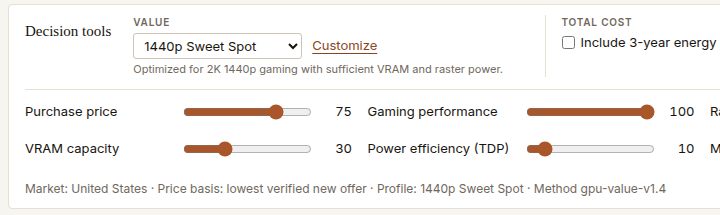
Custom weights
A weight of 0 ignores a factor. 100 counts it fully. Weights work relative to each other: raise price and cheaper products move up. Raise performance and faster ones move up. Change one at a time so you can see which weight moved which product.
- Tight budget: raise the price weight, and set a maximum price for money you cannot spend.
- Keeping it for years: raise freshness and warranty.
- Quiet or efficient: raise the power weight.
Total cost
Tick Include 3-year energy cost to add three years of electricity, at your rate, to the price side. It can change the order. It never changes a grade.
When the answer depends on you
If two products swap places when you change priorities a little, the choice is close and depends on what you value. Head-to-head pages call this priority sensitivity. If the order holds whatever you do, one product is simply the better deal for that job.
Your priorities carry over between the market, Compare and head-to-head pages, so you set them once.